10 Best Achievers Alternatives in 2026: Features, Pricing & Reviews

You’ve got Achievers on your shortlist. Maybe a peer recommended it, or it’s the first name that came up when you searched for recognition software.

Before you book that demo, know what you’re walking into. There’s no public pricing, so you won’t see a number until you’ve talked to sales. Reviewers mention long setups, a dated interface, and reporting that feels thin for the price. The whole thing leans hard on points and rewards, which isn’t what every team wants from recognition.

Better to find that out now than after you’ve signed. Here are the 10 best Achievers alternatives for 2026, with features, pricing, and real user reviews, so you can compare your options before you commit.

Why companies look for Achievers alternatives

Achievers is an employee recognition and rewards platform. Companies use it to celebrate contributions, hand out rewards, collect employee feedback, and measure engagement. It holds a 4.6/5 rating on G2, so this isn’t a product people are fleeing. Verified reviews do point to five recurring reasons buyers shop around.

1. Reward redemption can be frustrating

Some users say merchandise costs more points than expected, gift card choices vary, and certain rewards aren’t available when they try to redeem. A May 2026 G2 reviewer had trouble filtering the catalog and hit occasional delays. Others like the selection, so the experience seems to depend on reward type, location, and program.

2. Point allocation rules can feel restrictive

A March 2025 Capterra reviewer described limits on recognition boosts, and another wanted to split points into smaller amounts. These may be employer-configured budgets rather than limits built into Achievers.

3. Administration takes extra effort

A verified Capterra reviewer who runs a recognition program said they had to file support requests for changes they’d rather make themselves. G2 reviewers also say interface customization and admin reporting could be more flexible.

4. Pricing requires a sales conversation

Achievers uses custom pricing instead of a published per-user subscription. Ask for separate figures for software licensing, implementation, reward funding, and international fulfillment.

Achievers Intelligence now includes AI-supported behavioral insights, skills signals, and enterprise integrations. Still, if you need performance reviews, OKRs, calibration, and development planning in the same core platform, a broader talent management system may fit better.

Review sources: Achievers on G2 | Achievers on Capterra | Achievers pricing

Achievers alternatives comparison table for 2026

Engagedly is listed first because it’s our own product. The other nine are in no particular order.

ToolBest forStarting price
1. EngagedlyRecognition connected to performance$2/user/month*
2. WorkhumanGlobal enterprise recognitionContact sales
3. AwardcoGlobal rewards and incentivesPackages from $3,000 (100 or fewer employees)
4. BonuslyEveryday peer recognition$3/user/month (free plan up to 8 users)
5. NectarRecognition and employee communicationsContact sales
6. KudosValues-based recognitionContact sales
7. MotivosityTeam connection and flexible rewardsFrom $3,000/year (small business minimum)
8. O.C. TannerEnterprise service awardsContact sales
9. TerryberryService awards and recognition-led listeningContact sales
10. Assembly by Quantum WorkplaceRecognition within talent management$3/user/month

Engagedly’s $2 rate is for the Recognize & Reward Suite. Engage & Listen adds another $2 per user/month, and the Performance Suite is $5 to $8. Engagedly has a $7,500 minimum annual contract. Rates are billed annually.

Pricing checked on vendor websites October 13, 2026. Starting prices cover the entry recognition product only. Surveys, AI, and performance features may need separate products or subscription tiers.

What to look for in an Achievers alternative

A good replacement fixes a specific limitation without losing the recognition experience employees already like. Check these six things before you book a demo:

  1. Can employees recognize a coworker quickly, with options for public praise, private thanks, and company values?
  2. Does the rewards catalog work in every country where you have people? Compare redemption thresholds, currency support, product availability, and fulfillment fees.
  3. Does employee listening include confidential surveys, pulse checks, usable reporting, and a clear way for managers to act on feedback?
  4. Can recognition feed into goal conversations, reviews, and development plans?
  5. How much time will admins spend? Look at manager controls, budget allocation, reporting, and whether the AI actually helps.
  6. What does it cost overall? Add up licenses, minimum contracts, integrations, implementation, reward funding, and extra modules.

A lower per-employee price doesn’t make a tool cheaper to run. And a huge rewards catalog does nothing for you if employees can’t find rewards in their own country.

1. Engagedly: best for recognition connected to performance management
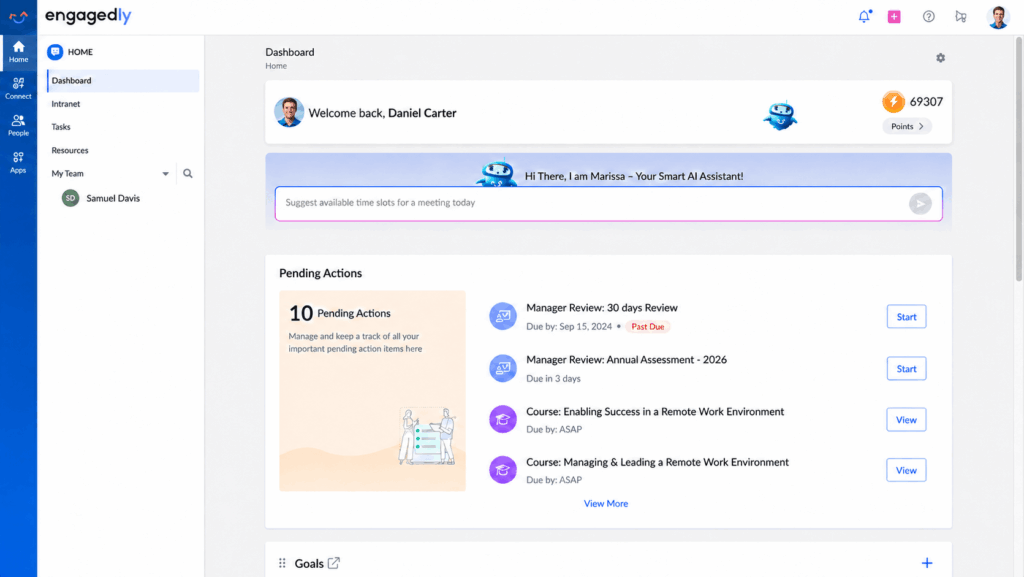
Engagedly, an Energage company, is an AI-powered talent management platform informed by insights from Top Workplaces Institute. Powered by Marissa™, its AI SuperAgent, Engagedly connects performance, engagement, learning, growth, and recognition in one unified experience through five suites: Recognize & Reward, Engage & Listen, Performance, Learning Experience (LXP+LMS), and Talent Mobility.

Here’s how the pieces work together. Employees can share public praise through Recognize & Reward, connect recognition to company values, and earn points or badges redeemable through reward storefronts featuring Tango gift cards and Switchfly travel and experiences. Meanwhile, Engage & Listen gathers survey and pulse feedback, with anonymity thresholds applied to aggregate dashboards.

Managers can use the Performance Suite to review documented recognition and feedback alongside goal progress, giving them a broader view of employee contributions. Recognition adds context without determining performance ratings. Marissa AI can help draft praise, summarize reviews, and analyze survey responses, while managers retain responsibility for reviewing AI-generated insights and making decisions.

By connecting these capabilities, Engagedly helps organizations reduce talent silos, turn people strategies into intelligent actions, and drive measurable business outcomes, including stronger engagement, better retention, and high-performing teams.

Pros

  • Recognition, engagement, and formal performance tools live in one platform.
  • Suites are modular, so you buy only what you need.
  • Prices are published, which is rare in this category.

Cons

  • Setting up several suites takes more planning than launching a standalone points app.
  • The $7,500 minimum annual contract is a hurdle for very small teams.
  • Rewards coverage by country needs checking, and Achievers’ global network is broader.
  • Its 4.3/5 G2 rating is the lowest of the 10 tools here. Reviewers want better AI summaries, reporting, and third-party project management integrations.

Pricing

From Engagedly’s pricing page, all billed annually:

  • Recognize & Reward: $2/user/month.
  • Engage & Listen: $2/user/month.
  • Performance Suite: $5 to $8/user/month.
  • Learning Suite: $3 to $5/user/month. Talent Mobility: $2/user/month.
  • Minimum annual contract: $7,500. Custom bundles and enterprise pricing are available.

G2 rating: 4.3/5, from about 545 reviews.

Engagedly vs. Achievers: Choose Engagedly if you want recognition tied to formal reviews, OKRs, and development planning, or if you’re trying to depend on fewer HR platforms. Choose Achievers if your main priority is a specialized global rewards program with deeper recognition analytics. For more criteria, see our guide to the best employee recognition software in 2026.

2. Workhuman: best for large enterprises with global recognition programs

Workhuman is an enterprise recognition platform and one of Achievers’ closest competitors. Social Recognition lets employees celebrate colleagues and hand out rewards through company-managed programs. Workhuman IQ analyzes recognition activity. Conversations ties ongoing feedback and performance discussions to recognition, which most recognition-only platforms don’t offer.

Pros

  • Strong fit for complex, multinational programs.
  • Employees often praise how visible public appreciation is.
  • Covers both recognition analytics and performance conversations.

Cons

  • Reviewers say merchandise value and availability vary.
  • Some users find catalog navigation, notifications, or searching past recognition inconvenient.

Pricing

Contact sales. Workhuman’s site shows no prices, only a demo request. Ask for a breakdown of platform costs and rewards spending.

G2 rating: 4.7/5.

Workhuman vs. Achievers: Both are strong enterprise platforms. Workhuman’s edge is Workhuman IQ analytics and Conversations. Achievers has its own increasingly capable AI and listening tools.

3. Awardco: best for global rewards and employee incentives

Awardco is a rewards and recognition platform for organizations that care most about a big rewards catalog and flexible incentives. It offers Amazon Business rewards, gift cards, travel, experiences, and custom rewards, plus Awardco Engage for employee feedback and Awardco Intelligence for AI-supported insights. Awardco says its reward network covers more than 163 countries.

Pros

  • Broad catalog with useful redemption choices.
  • Budget controls and approval workflows for admins.
  • Flexible program types, from service awards to spot recognition and incentives.

Cons

  • Some G2 reviewers want better reward filtering and navigation.
  • Users report occasional login trouble and extra steps for merchandise returns.

Pricing

Contact sales. Awardco’s plans page splits tiers by how many program types you can run: two on Standard, four on Scale, and all of them on Enterprise. Startups and small businesses with 100 or fewer employees can get packages starting at $3,000. That’s a package figure, not a per-user price.

G2 rating: 4.9/5.

Awardco vs. Achievers: Awardco is the better pick when redemption choice and configurable reward budgets matter most. Achievers may suit buyers who prefer its established recognition and listening ecosystem.

4. Bonusly: best for simple peer-to-peer recognition

Bonusly is built for teams that want frequent peer appreciation, small rewards, and recognition inside Slack and Microsoft Teams. It has grown past basic recognition. Paid plans now include manager check-ins, performance recaps, and AI help through Bizy.

Pros

  • Easy for employees to recognize coworkers regularly.
  • Published pricing and a free plan for small teams.
  • Integrations cut friction.

Cons

  • Some users report limited reward choices or restrictions tied to recognition budgets.
  • G2 reviewers have raised concerns about AI message suggestions and, in isolated cases, integration reliability or slow support.

Pricing

From Bonusly’s pricing page:

  • Free: $0 for up to 8 users.
  • Team without Bizy: $3/user/month, or $30/user/year.
  • Team with Bizy: $5/user/month billed monthly, or $50/user/year. Bizy is also sold as a $2/user/month add-on.
  • Organization: custom pricing.

Bonusly says all plans are billed annually. Rewards are billed separately at face value.

G2 rating: 4.7/5.

Bonusly vs. Achievers: Bonusly is a strong option for simple, frequent recognition. Achievers generally suits complex enterprise reward programs and broader listening needs.

5. Nectar: best for recognition, surveys, and internal communications
Nectar is a recognition and engagement platform for organizations that want peer rewards, employee surveys, and internal communications from one vendor. It sells Nectar Recognize, Nectar Engage, Nectar Comms, and Nectar Flows, and bundles them as Nectar One. Its ClaraAI assistant is part of the full bundle.

Pros

  • Straightforward recognition interface.
  • Recognition, listening, and communications can be bought together.
  • Useful for remote, hybrid, and deskless teams.

Cons

  • Some reviewers find point values too small to feel like a real reward.
  • Users report occasional limits on redemption amounts and required formats for recognition messages.

Pricing

Contact sales. Nectar’s pricing page shows product bundles and industry packages but no per-user price.

G2 rating: 4.7/5.

Nectar vs. Achievers: Nectar fits best when you want everyday recognition and internal communications together. Achievers has an established global rewards and analytics offering, while Nectar has a communications-focused product line.

6. Kudos: best for company values-based recognition

Kudos is a recognition platform for organizations that want appreciation tied to company values. It offers social recognition, rewards, and reporting without requiring a full talent management system, and it aims to make recognition visible across departments, including remote teams.

Pros

  • Easy for employees to share public appreciation.
  • Helpful for distributed teams where contributions are less visible.
  • Values-based recognition makes praise more specific.

Cons

  • Some G2 reviewers report high perceived redemption costs and limited regional reward choices.
  • Participation can drop if managers don’t encourage regular, meaningful recognition.

Pricing

Contact sales. Standard pricing isn’t consistently published for all configurations.

G2 rating: 4.8/5.

Kudos vs. Achievers: Kudos works when you want a focused, values-based platform. Achievers suits buyers who need a wider recognition and listening ecosystem.

7. Motivosity: best for team connection and flexible rewards

Motivosity is an engagement and recognition platform for organizations that want everyday appreciation, team connection, and flexible redemption. It pairs recognition with a social feed, employee spaces, and optional pulse surveys. It also offers a ThanksMatters Visa reward card and an AI initiative called Appreciation Intelligence, which is still in beta.

Pros

  • Flexible rewards, including options beyond traditional merchandise.
  • Social features help distributed employees connect.
  • International program support and configurable currency controls.

Cons

  • Some reviewers want larger recognition allowances, though employers set the budgets.
  • G2 feedback mentions repeated notifications and limits on certain gift-giving actions.

Pricing

Custom pricing. Motivosity’s pricing page describes a platform fee of roughly $0 to $2 per employee per month, with modules starting around $1. Small business plans have a $3,000 annual minimum. The page gives typical ranges of $3,000 to $10,000 a year for 20 to 250 employees and $7,500 to $75,000 for 250 to 5,000 employees.

G2 rating: 4.7/5.

Motivosity vs. Achievers: Motivosity is a good alternative when social connection and flexible rewards are central. Achievers may fit buyers who want a mature enterprise program with extensive workforce analytics.

8. O.C. Tanner Culture Cloud: best for enterprise recognition and service awards
Culture Cloud by O.C. Tanner is a recognition platform for large organizations with established service award programs. It pairs the software with decades of experience in symbolic awards and service milestones. O.C. Tanner also offers Culture Intelligence, AI-powered recognition help, and analytics on recognition participation and impact.

Pros

  • Strong emphasis on meaningful service recognition.
  • Global programs can support varied employee populations.
  • Users often praise the recognition experience and customer support.

Cons

  • Some G2 reviewers say new users need time to learn the platform.
  • Physical reward availability and shipment timing vary.

Pricing

Contact sales. Pricing depends on your recognition programs and service requirements, and O.C. Tanner’s site lists no prices.

G2 rating: 4.8/5.

O.C. Tanner vs. Achievers: O.C. Tanner is a strong pick for organizations built around service awards and recognition culture. Achievers suits those who prefer its combined recognition, listening, and behavioral intelligence platform.

9. Terryberry: best for service awards and recognition-led listening
Terryberry is a recognition and engagement platform for employers that need service awards, recognition programs, and employee listening. It’s especially relevant for managing milestone awards across multiple locations. Its offering includes Be Recognized, Be Heard, and connected engagement tools.

Pros

  • Strong support for structured service award programs.
  • Physical and symbolic rewards can feel more personal than points.
  • Connected recognition and listening tools support culture reporting.

Cons

  • Some reviewers report higher-than-expected merchandise and shipping costs.
  • G2 reviews include complaints about slow customer service and occasional login issues.

Pricing

Contact sales. Terryberry provides custom pricing for its recognition and engagement programs.

G2 rating: 4.6/5.

Terryberry vs. Achievers: Terryberry is worth a look when service awards and physical recognition are central to your program. Achievers has a broad digital rewards marketplace and AI-driven recognition analytics.

10. Assembly by Quantum Workplace: best for recognition connected to talent management

Assembly is a recognition and rewards platform that Quantum Workplace acquired in January 2026. Quantum Workplace is folding it into its broader talent management platform, which also covers engagement, performance, and development. That makes Assembly more relevant for buyers who want recognition tied to a bigger system.

Pros

  • Employees like the straightforward recognition experience.
  • Public recognition makes work visible across remote teams.
  • The acquisition connects recognition to Quantum Workplace’s engagement and performance products.

Cons

  • Some reviewers report limited reward options in particular countries.
  • Users mention occasional search difficulties, notification issues, and restricted point allocations.

Pricing

From Assembly’s pricing page: the Empower plan is $3/user/month, billed yearly, and Enterprise is custom. Quantum Workplace is a separate purchase. Its Engagement plan has a $15,000 minimum annual contract, so confirm terms if you bundle products.

G2 rating: 4.8/5.

Assembly vs. Achievers: Assembly is increasingly relevant for buyers who want recognition tied to a broader talent platform. Achievers remains a strong fit for organizations that prioritize specialized global recognition and rewards.

What 2025 and 2026 research says about recognition and engagement

Recent research suggests recognition programs should be judged on whether employees feel valued and whether managers act on feedback. Three findings stand out.

Global engagement fell to 21%

Gallup’s 2025 State of the Global Workplace findings put global employee engagement at 21% in 2024, down from 23% in 2023. Gallup estimated the drop cost the global economy $438 billion in lost productivity.

Manager engagement dropped to 27%

The same Gallup research found manager engagement fell from 30% to 27%. That matters because managers usually deliver recognition, respond to survey feedback, and follow up on performance concerns.

Recognition programs are common, but meaningful recognition isn’t

Quantum Workplace’s 2026 recognition research surveyed 593 U.S. employees. Of those, 67% said their organization had a formal recognition program, and 40% of that group said the recognition they received wasn’t meaningful. One in five respondents got no recognition at all in the previous year. Employees who received meaningful recognition, under the conditions measured, were 7.2 times more likely to say it would take a lot for them to leave.

Buying software isn’t the finish line. Look at recognition quality, manager behavior, survey follow-up, and whether recognition helps employees see what good performance looks like. For implementation ideas, see how to create an employee recognition program that works.

Which Achievers alternative fits your organization

It depends on the problem you’re solving. Some platforms specialize in global reward fulfillment. Others do better at linking recognition with employee listening and formal talent processes.

Buyer requirementRecommended toolsWhy
Enterprise recognitionWorkhuman, O.C. TannerGlobal program support and sophisticated recognition capabilities
Global and multi-currency rewardsAwardco, MotivosityFlexible international reward options and currency support
Budget-conscious teamsBonusly, AssemblyPublished entry pricing at $3/user/month
Recognition plus internal communicationsNectarRecognition, surveys, and employee communications
Company values-based recognitionKudosRecognition focused on everyday behaviors and values
Service anniversaries and physical awardsTerryberry, O.C. TannerSpecialized milestone and symbolic award programs
Recognition connected to performanceEngagedly, Assembly by Quantum WorkplaceAccess to broader talent management capabilities

If you already have a separate performance system and mainly want more recognition participation, a recognition-first tool like Bonusly, Kudos, or Awardco is the more practical shortlist. If you’re replacing disconnected recognition and performance tools, look at the talent platforms in the last row.

Feature count matters less than whether employees use the tool and managers act on what it shows them.

Final verdict: which Achievers alternative to choose

Achievers remains a strong choice for organizations focused on global recognition, rewards, and workforce listening. Switching only makes sense if you can name the gap you’re trying to close.

For large multinational programs, start with Workhuman or O.C. Tanner. For reward flexibility, look at Awardco or Motivosity. Bonusly is the low-cost, low-friction pick, Nectar fits teams that want internal communications alongside recognition, and Kudos fits values-driven cultures. Terryberry is built around service awards. If you want recognition inside a broader talent platform, compare Engagedly and Assembly by Quantum Workplace.

Whichever you shortlist, ask for a country-specific rewards catalog and a full cost breakdown. Then run the demo with the admins and managers who will use it every week, not just the buying committee.

If Engagedly is on your list, you can request a demo or read our 2026 performance management software comparison.
Frequently asked questions about Achievers alternatives

What is the best Achievers alternative?

There’s no single best option. Workhuman and O.C. Tanner suit large enterprise programs, Awardco suits buyers who want reward flexibility, Bonusly suits simple peer recognition, and Engagedly or Assembly by Quantum Workplace suit companies that want recognition tied to performance management.

 Is Achievers expensive?

It can be a significant investment, but the exact cost depends on a custom quote. Achievers doesn’t publish a standard per-user price. Compare licensing, implementation, reward budgets, fulfillment charges, and optional services, and judge the full annual program cost rather than software pricing alone.

Does Achievers include performance management?

Achievers covers recognition, engagement insights, skills signals, and performance-related behavioral analytics. Formal performance reviews and OKR management aren’t core native products. If you need appraisal cycles, goal tracking, calibration, and development workflows, look at broader platforms such as Engagedly or Quantum Workplace.

What is the difference between Achievers and Engagedly?

Achievers specializes in recognition, rewards, and listening. Engagedly adds formal talent management on top, with recognition and survey data connecting to its Performance Suite. Achievers has the more extensive global rewards network, so country coverage is worth verifying with Engagedly.

What is the cheapest alternative to Achievers?

Bonusly and Assembly both start at $3 per user per month on published pricing, and Bonusly has a free plan for up to 8 users. Engagedly’s recognition suite starts at $2 per user per month but requires a $7,500 minimum annual contract. Awardco and Motivosity both list $3,000 starting figures for small organizations.

Which Achievers alternatives offer global employee rewards?

Workhuman, Awardco, Motivosity, and O.C. Tanner are strong options for international rewards. Reward availability and fulfillment vary by country, so before you buy, ask for a country-specific catalog, confirm local currencies, and compare gift card availability, shipping charges, tax treatment, and redemption restrictions.

 Can employee recognition software improve retention?

It can, when it helps organizations deliver meaningful, consistent recognition. Quantum Workplace’s 2026 research links well-designed recognition to stronger intent to stay. Software alone won’t lower turnover. Managers still have to recognize meaningful work, respond to concerns, and fix the conditions driving dissatisfaction.

 Should companies combine recognition and performance management?

It can give managers better evidence when evaluating contributions. Recognition records add context to formal reviews, and engagement surveys flag team-level concerns. But recognition frequency should never replace objective performance evidence, and confidential survey responses shouldn’t be used to judge individual employees.

10 Best Employee Recognition Software for Manufacturing in 2026

Ask a plant manager how good work gets recognized, and you may hear familiar examples: a safety milestone banner near the entrance, a pizza lunch after a strong quarter, or a service award handed out after 10 years.

Those occasions deserve recognition.

But they can miss the employee who spotted a bearing about to fail on the night shift, alerted a supervisor, and helped prevent a much bigger production problem.

That is the recognition gap in manufacturing.

Recognition can arrive too late, too broadly, or only for major milestones. Across plants and shifts, that gap can take several forms:

  • Visibility: Day shift employees have more contact with leadership, while night and weekend crews receive less attention.
  • Access: Recognition shared through email or an intranet may never reach frontline employees who rarely use either.
  • Process: Supervisors put off acknowledging good work when it requires forms, approvals, or HR involvement.
  • Consistency: One plant recognizes contributions regularly, while another relies on occasional events.

A team celebration can acknowledge a strong result. Individual recognition tells employees what they did well and why it mattered.

That is where employee recognition software for manufacturing can help. It makes it easier to acknowledge good work when it happens and share it across plants and shifts.

A supervisor should be able to recognize someone from the floor using a phone, without submitting an HR request or waiting for the next company meeting. Employees should also be able to recognize colleagues and choose rewards they value.

The right platform gives HR visibility into how recognition is distributed, helping leaders answer a bigger question:

Who is being recognized, and who is consistently being overlooked?

Here are 10 employee recognition software platforms worth considering for manufacturing teams in 2026.

Best Employee Recognition Software for Manufacturing: Quick Comparison

PlatformBest forFrontline accessRewards & recognitionPricing
EngagedlyConnecting recognition with performance, learning, goals, and engagementMobile-friendlyPoints, praise, badges and milestonesQuote-based/modules vary
AchieversLarge, distributed manufacturing workforcesStrong mobile supportGlobal marketplace, social recognition and milestonesCustom quote
WorkhumanEnterprise recognition and workforce insightsMobile accessMonetary/social recognition and global rewardsCustom quote
AwardcoManufacturers prioritizing reward choiceMobile-friendlyLarge Amazon Business-powered reward networkCustom quote
O.C. TannerService awards and career milestonesMobile and digital accessSymbolic awards, milestones and rewardsCustom quote
NectarMid-market recognition and engagement programsMobile-friendlyPeer recognition, rewards and challengesCustom quote
GuustoFrontline workers without corporate emailSMS, QR, print and mobileRewards, milestones and recognitionFree tier; paid plans available
KudosValues-based employee recognitionMobile-friendlyRecognition, rewards and milestonesCustom quote
TerryberryDigital recognition plus physical awardsMobile-first optionsRecognition, symbolic awards and incentivesCustom quote
BonuslySimple peer-to-peer recognitionMobile appPoints, rewards and automated milestonesFree; paid plans available

What Should Manufacturers Look for in Employee Recognition Software?

Manufacturing environments have different requirements from desk-based organizations. Before comparing platforms, consider these questions.

1. Can frontline employees access it easily?

Employees should not need a laptop or corporate email address every time they want to participate.

Look for mobile access, employee-ID login, SMS, QR codes, kiosks, shared-device support, or other frontline-friendly options.

2. Can managers recognize employees in real time?

Recognition works better when it happens close to the contribution.

A supervisor should be able to recognize an employee after a safety improvement, production milestone, customer win, training achievement, or example of strong teamwork without completing a lengthy process.

3. Can recognition work across multiple plants and shifts?

A manufacturing company should be able to identify whether recognition is concentrated among particular locations, departments, managers, or shifts.

This becomes especially important for night and weekend employees who may have less interaction with senior leadership.

4. Does the platform support meaningful rewards?

Consider gift cards, merchandise, physical rewards, experiences, company rewards, charitable donations, and locally relevant options.

Reward availability can matter considerably for geographically distributed workforces.

5. Can it handle different types of recognition?

Manufacturers may need several programs, including:

  • Peer-to-peer recognition
  • Manager recognition
  • Safety achievements
  • Production milestones
  • Values-based recognition
  • Service anniversaries
  • Training completion
  • Employee-of-the-month programs
  • Spot awards

A platform that supports several programs can reduce the need to manage separate processes.

6. Can you measure participation?

HR teams should be able to understand who is receiving recognition, which managers are participating, and whether certain teams or locations are being overlooked.

1. Engagedly

Best for: Manufacturers that want recognition connected with performance, learning, goals, and employee engagement.

Engagedly, an Energage company, is an AI-powered talent management platform built to connect performance, engagement, learning, growth, and recognition in one unified experience. Powered by Marissa, its AI SuperAgent, and insights from Top Workplaces Institute, Engagedly helps organizations turn people strategies into intelligent actions and measurable business outcomes.

For manufacturers, Engagedly takes a broader approach to employee recognition by connecting it with other aspects of the employee experience rather than treating it as an isolated rewards tool. Employees and managers can use recognition alongside performance management, goals and OKRs, learning, feedback, surveys, and development programs.

For example, employees can be recognized for training new operators, consistently demonstrating company values, achieving production goals, or completing important development milestones. These activities can also inform performance and development conversations, giving HR teams a more connected view of employee contributions, growth, and engagement across plants and shifts.

This integrated approach helps manufacturers reduce talent silos, strengthen employee engagement, support retention, and build high-performing teams.

Key features

  • Peer-to-peer recognition
  • Manager-to-employee recognition
  • Public praise and feedback
  • Points-based rewards
  • Badges and gamification
  • Milestone recognition
  • Mobile access
  • Recognition tied to organizational values
  • Performance management
  • Goals and OKRs
  • Learning management
  • Employee surveys and feedback
  • 360-degree feedback

Where Engagedly stands out

The primary advantage is integration. Recognition can operate as part of a broader talent strategy rather than becoming another standalone application employees need to remember to use.

This may be especially valuable for manufacturing organizations already looking to improve performance management, frontline learning, employee feedback, or goal alignment.

Considerations

Manufacturers that only want a lightweight rewards application may find a dedicated recognition platform simpler.

Companies primarily focused on extremely large reward catalogs or highly customized physical service awards may also want to compare specialist vendors.

Pricing

Engagedly offers modular pricing based on employee count and selected products. Organizations should request pricing based on their workforce size and required modules.

2. Achievers

Achievers

Best for: Large manufacturers with distributed or global workforces.

Achievers is an established employee recognition platform designed for organizations running recognition programs at scale.

Its platform supports both monetary and non-monetary recognition, employee milestones, nomination programs, global rewards, mobile access, and analytics.

For manufacturing companies with employees spread across numerous sites or countries, the ability to deliver a relatively consistent recognition experience across different locations can be particularly valuable.

Achievers also offers integrations with major HCM platforms, which can simplify administration for larger organizations.

Key features

  • Peer and manager recognition
  • Monetary and non-monetary awards
  • Global rewards marketplace
  • Service anniversaries
  • Employee milestones
  • Nomination-based awards
  • Mobile and desktop access
  • Recognition newsfeed
  • Analytics and reporting
  • HCM integrations
  • Multi-language support

Where Achievers stands out

Its scale and global capabilities make it particularly relevant to manufacturers managing large employee populations across regions.

Considerations

The platform is primarily positioned toward larger organizations. Smaller manufacturers may find simpler tools easier to implement and manage.

Pricing

Achievers provides custom pricing based on organizational requirements.

3. Workhuman

Workhuman

Best for: Large enterprises looking for recognition combined with deeper workforce insights.

Workhuman is one of the more established enterprise recognition platforms and focuses heavily on social recognition, rewards, employee connection, and recognition data.

Employees can recognize colleagues while organizations manage award budgets, approvals, program participation, and global reward distribution.

Workhuman also connects recognition with performance conversations and uses recognition data to generate workforce insights.

That can make the platform particularly relevant to large manufacturers that want recognition data to provide more than participation metrics.

Key features

  • Peer-to-peer recognition
  • Monetary and non-monetary awards
  • Social recognition feeds
  • Global employee rewards
  • Service milestones
  • Recognition analytics
  • Award approval workflows
  • Budget management
  • Microsoft Teams and Slack integrations
  • Workday integration
  • Performance conversations
  • Recognition-based workforce insights

Where Workhuman stands out

Workhuman is particularly strong when recognition is expected to become a substantial enterprise program rather than a lightweight HR initiative.

Considerations

Its enterprise orientation can make implementation and program governance more involved than with simpler recognition tools.

Organizations should also assess the overall recognition and rewards budget required to drive participation.

Pricing

Pricing is provided through consultation with Workhuman.

4. Awardco

Awardco

Best for: Manufacturers that want employees to have a wide choice of rewards.

Awardco places considerable emphasis on the rewards experience.

Its integration with Amazon Business gives employees access to a large range of merchandise and other reward options while Awardco promotes zero markup on Amazon Business rewards.

That breadth can be useful in manufacturing environments where employee preferences can vary significantly across roles, locations, age groups, and shifts.

The platform can also support different recognition programs, including employee achievements, service milestones, incentives, and peer recognition.

Key features

  • Peer and manager recognition
  • Amazon Business reward integration
  • Merchandise and gift-card rewards
  • Zero-markup Amazon Business rewards
  • Employee milestones
  • Service awards
  • Incentive programs
  • Approval workflows
  • Recognition budgets
  • Reporting and analytics
  • Global reward options

Where Awardco stands out

Reward flexibility is the main differentiator.

Rather than limiting employees to a small curated catalog, manufacturers can provide substantially more choice.

Considerations

Companies whose priority is deeper talent management, learning, performance management, or employee listening may need additional platforms alongside Awardco.

Pricing

Awardco provides custom pricing based on plan and program requirements.

5. O.C. Tanner

O.C. Tanner

Best for: Manufacturers with long-tenure workforces and established service-award programs.

O.C. Tanner has a particularly strong focus on career milestones, symbolic recognition, and service awards.

That can make it relevant for established manufacturing companies where employees frequently remain with the organization for 10, 20, or even 30 years.

Its Culture Cloud platform combines digital recognition with anniversary programs, personalized awards, employee celebrations, global fulfillment, and physical recognition experiences.

Key features

  • Peer and manager recognition
  • Employee service awards
  • Career anniversary programs
  • Personalized Yearbooks
  • Custom symbolic awards
  • Social recognition feed
  • Reward points
  • Global award fulfillment
  • Employee milestone automation
  • Recognition analytics

Where O.C. Tanner stands out

O.C. Tanner offers considerably more depth around major career milestones and symbolic awards than many software-first recognition tools.

Considerations

Organizations primarily looking for quick, lightweight peer recognition may not require the depth of its service-award ecosystem.

Manufacturers should compare the complete program cost rather than looking only at software fees.

Pricing

O.C. Tanner provides customized pricing based on program scope and services.

6. Nectar

Nectar

Best for: Mid-market organizations looking for straightforward recognition and rewards.

Nectar provides employee recognition, rewards, engagement, and communication capabilities within one platform.

Employees can recognize colleagues based on company values, while managers can automate milestones and create challenges around organizational priorities.

For manufacturers, challenges can potentially be used to reinforce behaviors around safety, wellness, training, or other internal initiatives.

Combining recognition with employee communications may also be useful for organizations trying to improve engagement among distributed teams.

Key features

  • Peer-to-peer recognition
  • Manager recognition
  • Values-based recognition
  • Employee rewards
  • Company swag
  • Milestone automation
  • Employee challenges
  • Internal communications
  • Mobile access
  • Participation reporting
  • Recognition analytics

Where Nectar stands out

It provides a practical middle ground between lightweight recognition applications and large enterprise recognition platforms.

Considerations

Companies requiring highly advanced workforce analytics or complex global reward programs may find enterprise platforms more suitable.

Pricing

Nectar currently provides customized pricing depending on the products and program configuration selected.

7. Guusto

Guusto

Best for: Frontline manufacturing teams with limited access to corporate email or HR systems.

Guusto is particularly relevant when accessibility is the biggest obstacle to employee recognition.

The platform supports recognition through email, SMS, mobile, QR codes, and printable rewards. Employees can therefore receive recognition even when they do not have a corporate email account or regularly use company software.

That flexibility can be useful for production workers, contractors, warehouse employees, technicians, and other deskless roles.

Guusto also takes a somewhat different approach to pricing by distinguishing between employees who send recognition and those who primarily receive it.

Key features

  • Employee rewards
  • Peer-to-peer recognition
  • Manager recognition
  • SMS delivery
  • QR-code rewards
  • Printable rewards
  • Mobile app
  • Employee milestones
  • Recognition automation
  • Social recognition feeds
  • Budget controls
  • Recognition reporting

Where Guusto stands out

Its multiple recognition delivery methods make it one of the more interesting options for workers who do not regularly access corporate systems.

Considerations

Organizations looking for a broader talent management suite covering performance, learning, goals, succession planning, and other HR processes will need additional tools.

Pricing

Guusto offers a free option. Its Lite plan starts at $150 per month, while higher tiers use sender and recipient seat pricing with minimum monthly commitments.

8. Kudos

Kudos

Best for: Organizations that want recognition strongly connected to company values and culture.

Kudos focuses on helping organizations make recognition meaningful rather than simply increasing the number of recognition messages employees send.

Recognition can be connected to company values, while employees can access rewards including merchandise, gift cards, experiences, charitable options, and other locally relevant choices.

For manufacturers trying to reinforce specific behaviors or cultural principles across multiple facilities, values-based recognition can provide a consistent framework.

Key features

  • Peer recognition
  • Manager recognition
  • Values-based recognition
  • Employee rewards
  • Social recognition
  • Employee milestones
  • Recognition analytics
  • Multi-language support
  • Mobile access
  • Configurable reward catalogs

Where Kudos stands out

Its culture-oriented approach can work well for companies where the objective is reinforcing behaviors and organizational values rather than simply distributing points.

Considerations

Manufacturers focused primarily on safety incentives, physical service awards, or deeply integrated talent management may prefer platforms specializing in those areas.

Pricing

Kudos uses custom pricing based on organizational requirements.

9. Terryberry

Terryberry

Best for: Manufacturers that want to combine digital recognition with physical awards.

Terryberry combines modern employee recognition software with a long history of creating physical and symbolic employee awards.

Employees can participate through digital recognition programs while organizations can also provide physical awards for service anniversaries, career achievements, safety milestones, or other significant contributions.

This combination can suit manufacturing environments where tangible recognition continues to carry importance alongside digital recognition.

Key features

  • Peer and manager recognition
  • Mobile recognition
  • Employee service awards
  • Custom physical awards
  • Symbolic recognition
  • Safety incentive programs
  • Employee milestones
  • Reward options
  • Recognition program support
  • Employee engagement capabilities

Where Terryberry stands out

Its combination of software and physical recognition gives manufacturers more flexibility in designing programs for both everyday achievements and major milestones.

Considerations

Organizations looking primarily for advanced talent analytics or performance-management integration may need additional HR technology.

Pricing

Terryberry provides customized pricing based on the recognition programs and services selected.

10. Bonusly

Bonusly

Best for: Organizations that want a simple peer-to-peer recognition program that can be launched quickly.

Bonusly provides a straightforward recognition model in which employees can recognize peers and award points that can later be redeemed for rewards.

Its relatively simple interface and integrations with common workplace tools can make adoption easier for organizations that do not need a complex enterprise recognition program.

Bonusly also includes automated milestone celebrations, mobile applications, analytics, and HRIS integrations on its paid plans.

Key features

  • Peer-to-peer recognition
  • Points-based rewards
  • Automated milestones
  • Recognition analytics
  • Mobile apps
  • HRIS integrations
  • Microsoft Teams integration
  • Slack integration
  • Employee announcements on higher tiers
  • Recognition and engagement tools

Where Bonusly stands out

Simplicity is its biggest advantage. Organizations can implement a basic recognition program without building a highly complex recognition infrastructure.

Considerations

Manufacturers with large populations of employees who do not use company email, Slack, Teams, or other digital workplace tools should carefully test frontline access before rollout.

Pricing

Bonusly offers a free plan for up to eight users. Its Team plan is currently listed at $5 per user per month, with custom pricing available for larger organizations.

Which Employee Recognition Software Is Best for Manufacturing?

There is no single platform that is the right fit for every manufacturer.

The best choice depends primarily on how your workforce works and what you want recognition to accomplish.

If your priority is…Platforms worth considering
Connecting recognition with performance, learning and goalsEngagedly
Large-scale global recognitionAchievers, Workhuman
Extensive employee reward choiceAwardco
Long-service and career milestone recognitionO.C. Tanner, Terryberry
Reaching employees without corporate emailGuusto
Mid-market recognition and engagementNectar
Values-based culture recognitionKudos
Simple peer-to-peer recognitionBonusly

Manufacturers should avoid selecting software based solely on the size of the reward catalog or the number of recognition features.

The more important question is whether employees and supervisors will actually use the platform across every shift and location.

How to Choose Employee Recognition Software for Manufacturing

Start with frontline accessibility

Before comparing reward catalogs or analytics dashboards, determine how employees will access the platform.

If most operators do not have corporate email accounts or company laptops, test the frontline experience during the product demonstration.

Ask vendors to demonstrate exactly how a production employee would:

  1. Log in.
  2. Recognize a colleague.
  3. Receive recognition.
  4. Redeem a reward.
  5. Check their recognition history.

Do not rely solely on an administrator demonstration.

Look at recognition across shifts

Recognition can easily become concentrated among employees who work during traditional office hours.

Ask whether reporting can identify participation differences across locations, departments, managers, and employee groups.

This can help HR identify plants or teams where recognition is not happening consistently.

Decide what you want to recognize

Different programs may require different capabilities.

A manufacturer might want to recognize:

  • Safe working behaviors
  • Continuous improvement ideas
  • Training achievements
  • Production milestones
  • Quality improvements
  • Teamwork
  • Leadership
  • Company values
  • Customer service
  • Career milestones

Define these use cases before evaluating software.

Understand the complete cost

Recognition software typically includes two separate costs:

Platform cost: What you pay for the technology.

Reward budget: What you allocate for employee rewards.

There may also be implementation, fulfillment, shipping, integration, or program-management costs.

Ask each vendor to provide the expected annual cost based on your workforce size and expected reward usage.

Run a pilot before expanding company-wide

For a multi-plant organization, consider starting with one facility, department, or business unit.

Measure:

  • Employee participation
  • Manager participation
  • Recognition frequency
  • Reward redemption
  • Mobile adoption
  • Recognition across shifts
  • Employee feedback

These insights can help improve the program before expanding it across the organization.

Why Employee Recognition Is Different in Manufacturing

Manufacturing recognition programs face challenges that are less common in desk-based workplaces.

Employees are spread across shifts

Leadership may regularly interact with the day shift while having far less visibility into evenings, nights, and weekends.

Digital recognition can help make achievements visible beyond the employee’s immediate shift.

Many employees are deskless

Production employees may not use email, Slack, Microsoft Teams, or a company laptop during their working day.

Recognition therefore needs to be available through channels employees can realistically access.

Recognition needs to happen quickly

A supervisor who sees an employee prevent a safety issue or solve a production problem should be able to recognize that contribution while it is still relevant.

If the process requires paperwork or HR approval, recognition is more likely to be delayed or forgotten.

Plants can develop different recognition cultures

One facility may have managers who recognize employees frequently while another may rarely do so.

Centralized recognition software can give HR better visibility into these differences.

Final Thoughts

The best employee recognition software for manufacturing is not necessarily the platform with the biggest rewards catalog or the longest feature list.

It is the platform employees and supervisors can realistically use across plants, production lines, locations, and shifts.

Achievers and Workhuman provide extensive capabilities for large enterprise recognition programs. Awardco is notable for reward choice, while O.C. Tanner and Terryberry are particularly relevant for organizations with established service-award programs. Guusto offers flexible options for reaching employees without traditional corporate accounts, while Nectar, Kudos, and Bonusly provide different approaches to everyday employee recognition.

For manufacturers that want recognition to connect with performance management, learning, goals, feedback, and employee development, Engagedly offers a broader talent-management approach rather than treating recognition as a standalone program.

Whichever platform you choose, start with one question:

Can every employee – from the corporate office to the night shift on the plant floor – participate easily?

If the answer is no, even the most feature-rich recognition platform is unlikely to deliver the participation you need.

FAQs About Employee Recognition Software for Manufacturing

What is employee recognition software for manufacturing?

Common Betterworks alternatives include Engagedly, Lattice, Leapsome, 15Five, Culture Amp, PerformYard, Quantum Workplace, Profit.co, Perdoo, and Workday.

The most appropriate option depends on whether an organization prioritizes performance reviews, OKRs, employee engagement, manager development, learning, or broader talent management.

What is the best employee recognition software for manufacturing?

The best platform depends on the manufacturer’s needs.

Engagedly is worth considering when recognition needs to connect with performance management, learning, goals, feedback, and employee engagement.

Achievers and Workhuman are designed for larger enterprise programs, while Guusto provides flexible options for reaching frontline employees. Awardco emphasizes employee reward choice, and O.C. Tanner and Terryberry provide strong service-award capabilities.

How can manufacturers recognize employees without company email addresses?

Manufacturers can use recognition platforms that support alternatives such as:
Mobile apps
SMS
QR codes
Employee-ID authentication
Printable reward codes
Shared devices
Manager-assisted recognition
The correct approach depends on how employees already access workplace technology.

Can recognition software work across multiple manufacturing plants?

Yes.

Many recognition platforms allow organizations to manage employees across multiple locations and provide centralized reporting.

Manufacturers should look for reporting that can segment recognition activity by location, department, manager, or employee group to identify participation gaps.

Can employee recognition software be used for safety programs?

Yes.

Manufacturers can use recognition programs to reinforce safe behaviors, safety improvements, reporting, training completion, and other safety-related achievements.
However, recognition should complement – not replace – formal safety management, training, reporting, and compliance processes.

Should manufacturers use monetary or non-monetary recognition?

Most organizations benefit from a combination.
Non-monetary recognition such as public praise can make achievements visible and reinforce desired behaviors, while rewards can provide additional tangible value.
The appropriate balance depends on workforce preferences, budget, culture, and the type of achievement being recognized.

How much does employee recognition software cost?

Pricing varies significantly.

Some platforms charge per employee per month, while enterprise vendors provide custom quotes. Organizations may also need a separate budget for gift cards, merchandise, service awards, or other employee rewards.

Manufacturers should compare the total annual program cost, not only the software subscription.

What metrics should manufacturers track?

Useful employee recognition metrics include:

Recognition participation rate
Recognition frequency
Percentage of employees receiving recognition
Manager participation
Peer-to-peer recognition activity
Reward redemption rate
Recognition by location
Recognition by department
Recognition across shifts
Recognition tied to company values
These metrics help HR determine whether recognition is reaching the workforce consistently.

AI in the Employee Experience: Where It Helps, Where It Hurts, and How to Use It Responsibly

Ask your team, honestly, how many of them used AI this week. The number will be higher than your policy assumes.

Three out of four knowledge workers now use generative AI at work, and 78% of them brought their own tools without waiting for IT or a policy.

AI in the employee experience is already in the building, not a line item on next year’s roadmap.

The only open question is which uses make work better, which quietly make it worse, and whether you are deciding that on purpose or letting it happen by default.

Employee experience, or EX, is what all of that adds up to. Great Place To Work defines it as “the cumulative assessment of an employee’s interaction with your company and its people,” from the first day of onboarding to the last day on the job.

Its foundation is trust: whether people feel respected and treated fairly by the people they work for.

That is what makes AI a double-edged tool here. The same systems that hand people time and a fairer shot can also quietly corrode the trust the whole experience rests on.

Most coverage asks whether AI is good or bad for employees. That is the wrong question.

The same models that draft a manager’s feedback in seconds also flood inboxes with confident, hollow text that a colleague then has to redo. The same system that spots a flight risk can also rank people on yesterday’s bias.

AI is not one thing you approve or ban. It is a set of choices, made use by use, and each one either gives the employee something or takes something away.

Every AI use either gives or takes

Before any pilot, run the use case through one question. Does it hand the employee something they value, such as time back or a fairer shot, or does it quietly take something, such as autonomy or the human contact that makes work bearable?

The table below is the version to keep on the wall.

Use of AITends to help when it…Tends to hurt when it…
OnboardingGuides a new hire and answers day-one questionsReplaces the human welcome with a bot and a checklist
Employee listeningSurfaces themes from feedback people chose to giveAnalyzes private messages nobody consented to share
Feedback and reviewsDrafts a first pass a manager edits and ownsWrites the final review no human really read
Productivity toolsRemoves drudgery so people do deeper workSets the pace and counts every keystroke
DevelopmentPersonalizes learning and surfaces internal movesReplaces the manager conversation about someone’s future

If a use case only makes sense because it takes a human out of a decision that affects someone’s livelihood, that is the tell.

Where AI earns its place

“AI is the new electricity,” Andrew Ng told a Stanford audience, meaning it will run quietly under almost everything rather than sit in one visible box. In the employee experience, the current is already flowing in a few clear places.

Onboarding: a stronger first 90 days

Employee experience starts on day one, and it is easy to fumble. New hires drown in paperwork and hesitate to ask small questions. Remote starters miss the hallway cues entirely.

AI smooths that first stretch. An onboarding assistant answers policy questions around the clock, tracks each new hire’s progress, and reminds managers to book the early one-to-ones that set the tone. None of it replaces the welcome; it just makes sure the human parts happen.

Development: growth that finds the person

  • Personalized learning paths built from role and skill gaps
  • Internal moves and career paths a manager might miss
  • AI-drafted development plans a person approves

Generic training catalogs are giving way to systems that read a person’s role and skills and put the right next lesson in front of them, then surface internal moves a manager might never have flagged.

This is where tools like an AI-assisted learning platform and talent-mobility software do their best work, matching people to growth instead of leaving it to whoever is loudest in calibration.

Listening: comments that get acted on

  • Theme and sentiment clustering across thousands of comments
  • Burnout and well-being signals from pulse surveys
  • Works only on feedback people chose to give

Reading ten thousand open-text survey comments by hand is impossible, so most of them go unread.

AI can cluster them into themes in minutes, which means the survey people actually filled out gets used. Run on data people chose to give, this builds trust rather than spending it.

Admin: hours handed back

  • Round-the-clock answers to HR policy questions
  • First drafts of summaries, forms, and reviews
  • Onboarding task tracking and compliance reminders

AI answers the repetitive HR questions, drafts the policy summary, and fills the first version of the form, handing people back the hours those tasks used to eat.

Microsoft found its heaviest AI users save more than 30 minutes a day. Across a company, that is a great deal of human attention returned to work that needs a human.

For where teams usually begin, our rundown of the best AI tools for HR maps the practical starting points.

None of that is the risk. The risk is what happens when the same tools get pointed at the parts of work that were never meant to be automated.

Where AI quietly does damage

Bias in reviews and promotions

  • Models learn from a company’s own past decisions
  • A skewed history teaches the model a skewed rule
  • Automation makes a biased call faster and harder to appeal

The lesson is already on record. Amazon built a tool to score resumes and, because a decade of its hires skewed male, the model decided male was the signal, downgrading anything that contained “women’s.”

The company scrapped it in 2018, and only caught it because a human went looking.

The same trap waits inside the employee experience. An AI that ranks performance or recommends a raise learns from who got rewarded before. Feed it a biased history, and it will repeat that history, now wearing the authority of a number.

This is what Cathy O’Neil named in Weapons of Math Destruction: “models are opinions embedded in mathematics.” Automating a biased process does not make it fair, only faster and harder to argue with.

Surveillance that trades trust for data

  • Keystroke, desk-time, and app-usage tracking
  • 61% of Americans oppose AI tracking their movements
  • Produces compliance and quiet exits, not engagement

Tools that track keystrokes, desk time, and app usage promise productivity data and deliver a trust problem. Americans have made their view clear: 61% oppose AI tracking their movements, and most oppose recording what they do on their computers.

Watch people that closely and you do not get engagement. You get compliance, and the quiet exit of anyone with options.

Workslop: polished but hollow

  • Output that looks like work but carries no real thought
  • Around $186 per employee a month in cleanup time
  • 42% trust the sender less afterward

When everyone can generate polished text, some of it is what researchers call “workslop”: output that looks like work but carries no real thought, passed to a colleague who then has to redo it.

A 2025 study put the cost at about $186 per employee a month and found that 42% of people who received workslop trusted the sender less afterward.

AI meant to speed work up ended up spending both time and trust.

Automating the parts that need a human

  • Reviews no human actually wrote
  • Recognition auto-generated from a template
  • Development plans owned by no one

This harm is the least dramatic and the most common. It is the slow handoff of the human parts of management to a machine: the review nobody actually wrote, the recognition auto-generated from a template that fools no one.

Each of those is efficient. Together they tell employees the organization could not be bothered to show up in person for the moments that matter.

The pattern across all four is the same. AI is safe on the drudgery and dangerous on the relationship, and the job of a responsible rollout is to keep that line bright.

None of the four is inevitable. Each has a design answer, and it is the answer a responsible platform is built around.

This is where a tool like Engagedly earns its keep.

Its AI detects and explains its recommendations rather than hiding a decision inside a score, so a skewed pattern is visible before it hardens into a rating. It reads engagement from feedback people choose to give, not from keystroke surveillance.

Its review and feedback assistants draft from an employee’s real goals and history, so the output is a grounded first pass rather than workslop. And every recommendation stays human-in-the-loop, so the review and the career conversation remain a person’s to make.

How to use AI in the employee experience responsibly

Responsible use is a set of defaults you can actually enforce, not a values statement on a wall.

Five rules cover most of it:

RuleWhat it means
Keep a human on every consequential decisionAI can draft and flag. A person makes the call and signs the review.
Tell peopleIf an AI tool touches someone’s feedback or performance, say so plainly. Undisclosed AI is where trust goes to die.
Audit for bias on a scheduleNew York City’s Local Law 144 already requires an independent bias audit of automated tools that screen people for hiring or promotion, plus notice to those affected. Treat that as the floor.
Know which rules applyThe EU AI Act classifies hiring and worker-management AI as “high-risk,” with real obligations, and it reaches any company whose tools touch people in the EU.
Govern the AI people already broughtWith 78% of users on their own tools, the risk is not that AI arrives but that it arrived unmanaged, carrying company data into apps nobody vetted.

When you buy, hold the vendor to the same standard: human-in-the-loop design, explainable recommendations, built-in bias detection, and real compliance credentials like GDPR, SOC 2 Type II, and CCPA. A serious provider states this plainly. One that asks you to just trust it isn’t serious.

Beneath every rule sits one principle: point AI at the work people are happy to give up, the sorting and the rough drafts, and keep people pointed at each other. A hard piece of feedback, a decision about someone’s future, these aren’t inefficiencies to automate away. They’re the job.

Putting it in place without a year-long committee

You do not need a task force to start. You need an inventory and a bright line, and you can draw both this quarter.

StepDo thisWhy it matters
InventoryList every AI tool already in use, sanctioned or notYou cannot govern what you cannot see
Draw the lineName the decisions AI may inform but never makeProtects trust and keeps you on the right side of the law
Disclose and auditTell employees where AI is used, and audit any tool that scores or ranks peopleMeets Local Law 144 and earns back trust
Redeploy the timePush AI onto admin, reinvest the saved hours in manager conversationsTurns raw efficiency into a better experience

The sequence matters. Governance first, then disclosure, then the payoff of redeployed time. Skip the first two and the fourth never arrives.

Where Engagedly fits

AI on the grunt work, humans on the relationship: that responsible split is exactly how Engagedly’s AI Talent Suite is built.

Its contextual AI SuperAgent, Marissa, works through specialized agents rather than one black box. The Performance Review Assistant drafts a fair first review from an employee’s goals and feedback, then hands it to the manager to edit and own. A Feedback Agent surfaces sentiment buried in employee survey comments. An HR Assistant answers policy questions around the clock. Growth and Learning agents build development plans tied to real skill gaps, not guesswork.

The guardrails are the point. Every recommendation stays human-in-the-loop and explainable, bias detection is built in, and your data runs under GDPR, SOC 2 Type II, and CCPA compliance.

The results follow. Engagedly reports that teams using Marissa cut time on performance reviews by 60%, align goals 2.5x faster, lift engagement in 1:1s by 47%, and improve development-plan completion by 30%.

What the software will not do is make the call for you. It can flag a flight risk or draft the review, but the conversation that keeps someone is still yours to have. That’s the point.

If you are comparing platforms, our comparison of engagement and performance tools lays out the options plainly. Want to see responsible AI actually give your managers their time back? Book a demo.

Frequently asked questions

How is AI used in the employee experience?

Mostly in four places: guiding onboarding and answering HR questions, personalizing learning and surfacing internal moves, detecting themes across employee survey comments, and taking repetitive admin off people’s plates. The common thread is speed and scale on tasks humans do slowly. Microsoft found 75% of knowledge workers already use AI at work, so most organizations are further in than their policies admit.

Can AI be biased in reviews and promotions?

Yes, because it learns from a company’s past decisions. Amazon’s scrapped hiring AI is the famous warning: trained on a decade of mostly male hires, it taught itself to penalize resumes that said “women’s.” The same risk applies to any model that rates performance or recommends a raise. It scales whatever bias is in the history unless someone audits for it, which is why bias audits are becoming law.

Does AI-based employee monitoring improve productivity?

The productivity case is weak and the trust cost is high. In Pew Research surveys, 61% of Americans oppose AI tracking their movements and most oppose recording their computer activity. Close monitoring tends to produce compliance rather than engagement, and pushes your most employable people toward the door. Measuring outcomes beats surveilling activity.

Is AI in HR legal, and what rules apply?

It is legal, but increasingly regulated. New York City’s Local Law 144 requires bias audits and notice for automated tools used to hire or promote, and the EU AI Act classifies worker-management AI as high-risk, with obligations that reach any company using such tools on people in the EU. Assume more jurisdictions will follow, and keep documentation now.

Will AI replace HR teams and managers?

No, but it changes the job. AI takes the administrative load, which frees managers for the human work it cannot do, like honest feedback and the conversation about someone’s future. Microsoft’s heaviest AI users report saving more than 30 minutes a day, and the organizations that win reinvest that time in people rather than cutting headcount.

How do we start using AI in HR responsibly?

Begin with an inventory of what is already in use, then draw a clear line between decisions AI may inform and decisions only a human makes. Disclose where AI touches employees, audit any tool that scores or ranks people, and redirect the time saved into manager conversations. None of this requires a year-long committee, and skipping it is how trust erodes.

The Shift From HR Tools to HR Infrastructure Platforms

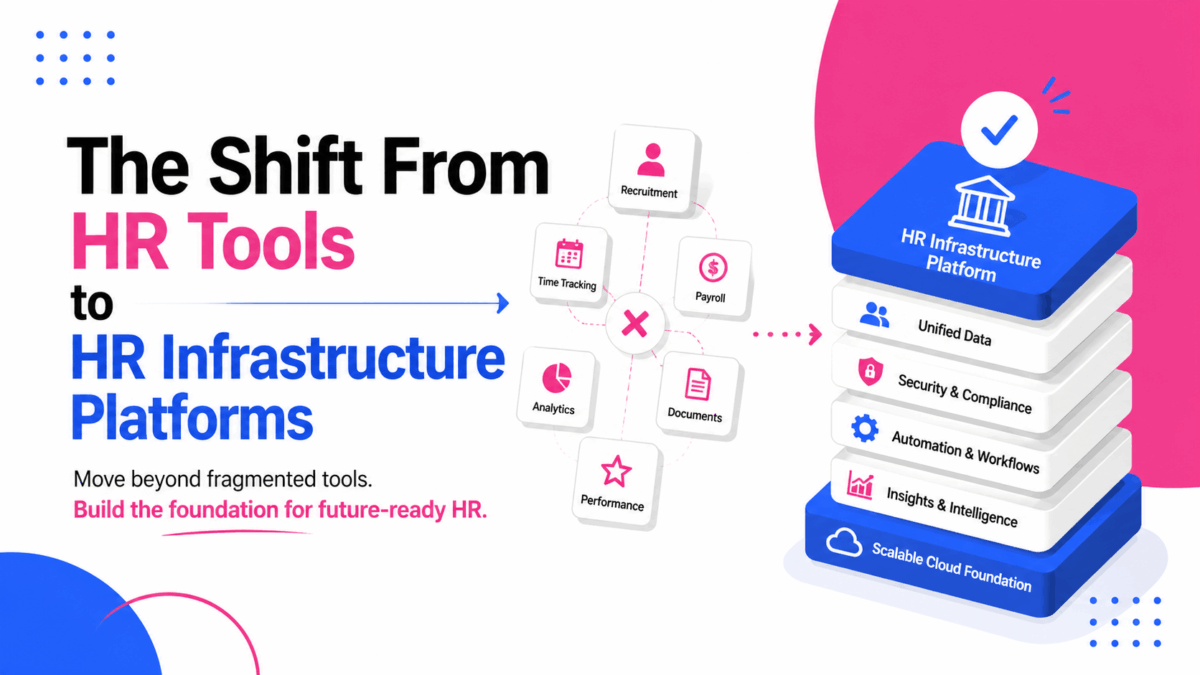
Not long ago, HR teams juggled a stack of point solutions to get through the week. One app for payroll; another for time tracking, A standalone performance tool; a learning portal. And an ATS held together with spreadsheets and goodwill. 

Those tools did the job. However, they rarely talked to each other. Data got stuck in silos. Employees bounced between logins. Managers guessed more than they should have.

Something’s changing. HR infrastructure platforms are replacing collections of disconnected tools with a single, integrated backbone for people operations. With this in place, you’re building the foundation for your entire people strategy.

Why does this matter now? Business moves faster than it used to. Talent markets shift. Roles evolve. Compliance rules change. Companies that treat HR technology as core infrastructure adapt better when things move.

Keep reading to learn how to shift from HR tools to HR platforms for your company or organization.

HR Tools vs. HR Infrastructure Platforms

  • Traditional HR tools solve one task at a time. Run payroll, schedule shifts, file expenses, request PTO, and complete a review cycle. 

They’re usually easy to buy and roll out, and for a while, that works. But as you grow, each new tool becomes another island. Integrations help, but only so much. See HR tech trends in 2026, which companies sometimes invest in separately.

  • HR infrastructure platforms work differently. They provide a connected layer that spans the employee lifecycle (hiring, onboarding, performance, learning, engagement, compensation, and offboarding). They take into account the PPT framework: 
  • People
  • Process
  • Technology

With this in place, data flows end-to-end. You get a shared employee profile, consistent permissions, unified analytics. Not to mention a common team experience. You operate one platform where modules already work together. Rather than stitching five tools together.

The key differences:

HR ToolsHR Infrastructure Platforms
They handle tasksThey handle outcomes
They fix immediate problemsThey build long-term agility
They capture dataThey turn it into insight and action

Driving forces behind the transition

Several forces are pushing organizations toward platforms:

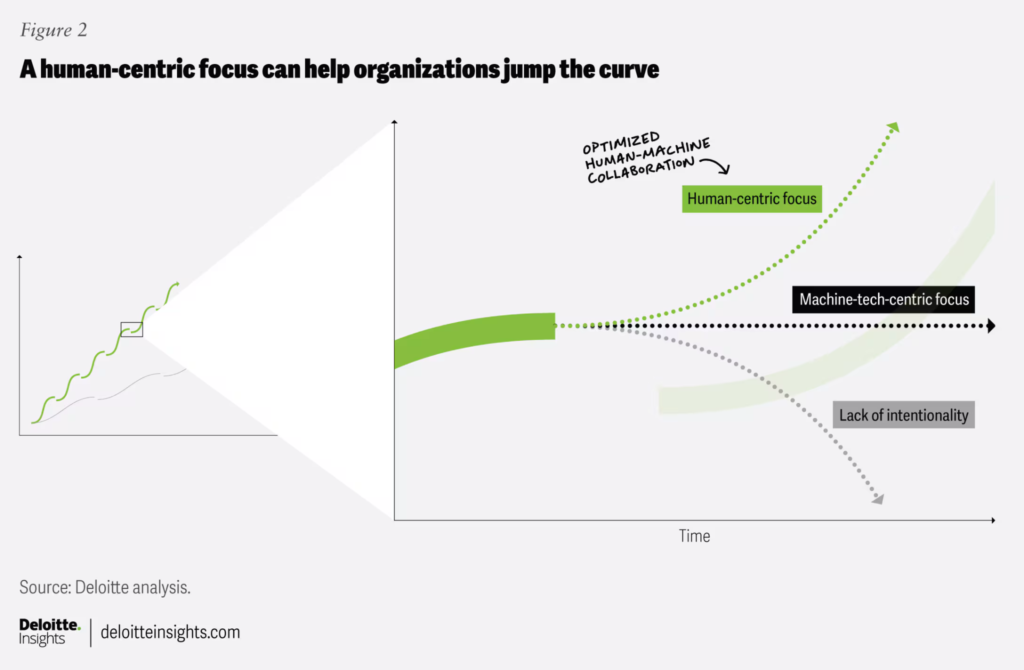
  • Cloud-native architectures smoothen integration. AI and machine learning bring pattern recognition and recommendations to everyday HR decisions. Deloitte’s Human Capital Trends research shows that organizations are redesigning work around human-and-technology collaboration.

Image source

  • Workforce complexity keeps multiplying. Hybrid work, global hiring, contingent labor, and skills-based staffing add more moving parts. A unified platform gives you one source of truth across locations and workflows.
  • Employee expectations have shifted. People want the same frictionless digital experience at work that they have in their personal lives. When you’re competing for talent, the friction of logging into six different systems to complete onboarding matters. That’s what it takes to create a great employee experience with technology. 
  • Leaders need real-time visibility. Visibility into hiring funnels, performance trends, engagement hot spots, skills gaps, and internal mobility. That’s hard when the story is chopped into separate tools. People analytics drives business value when it sits on clean, connected data across the employee lifecycle. 

Taken together, these shifts point in the same direction: fragmentation no longer scales. With HR infrastructure, teams can see what employees actually want using real data, whether that’s preferences or participation trends. That makes it easier to plan things like a blank t-shirt collection for giveaways or team-building activities for engagement based on real demand.

Benefits and Challenges in Adopting HR Infrastructure Platforms

Potential benefits

When the parts work together, the whole gets smarter. Possible advantages:

  • Efficiency scales better. Fewer duplicate logins and manual data handoffs. Automations span entire workflows. A candidate accepts an offer. And the system triggers IT provisioning, onboarding tasks, learning paths, and manager check-ins without anyone having to chase five systems.
  • You get real-time insights. A unified data model lets you track time-to-fill, first-year attrition, manager coaching activity, and internal mobility in one place. You spend less time reconciling reports and more time acting on what they say.
  • The employee experience improves. From onboarding through growth, employees see an integrated journey. Learning recommendations align with goals. Feedback and recognition are woven into daily work. Pay and performance live side by side.

Platforms with open APIs and modular capabilities make it easier to plug in new tech and adjust as your organization evolves. That flexibility also helps HR respond quickly to different employee needs. Whether it’s improving day-to-day worker experiences or supporting more complex, sensitive matters like family law and health benefits, without rebuilding systems from scratch.

Possible challenges

Platform transitions are big projects. The common hurdles:

  • Upfront investment matters. Consolidating tools and migrating data require budget and time. Clear success metrics and a phased roadmap help keep momentum.
  • Old habits are sticky. Technology is only part of the equation. You need a solid change management plan that addresses resistance and skill gaps. Organizations that invest in thorough training and communicate clearly see smoother transitions and faster ROI.
  • Centralizing data risks privacy and security. Look for vendors with strong certifications and controls (ISO 27001 and SOC 2). If you operate in the EU, ensure compliance with GDPR. If you’re testing AI-powered features, track evolving guidance on fairness and transparency.

Image source

Admins and managers also need time to adjust to new ways of working. Plan role-based training and give people space to practice so adoption sticks. This is especially important when integrating tools like contract management software into your HR infrastructure. Where consistent use and proper workflows are key to keeping data accurate and connected.

A few shifts worth watching:

  • AI is moving from descriptive to prescriptive. Today’s dashboards tell you what happened. Tomorrow’s platforms will help you decide what to do next. Systems that predict which employees are ready for promotion suggest optimal team compositions for projects. Or identify emerging skills gaps before they impact business performance.
  • People’s data is getting richer. Skills taxonomies, internal mobility signals, even learning outcomes will feed more dynamic talent marketplaces. Organizations will increasingly manage work around skills rather than fixed roles. A theme echoed in the World Economic Forum’s Future of Jobs research.

Image source

  • Workforce planning is becoming more proactive. Predictive models that forecast hiring needs and capacity constraints will help leaders get ahead of change rather than react to it. The key is grounding predictions in transparent methods and audited data sources.
  • Immersive learning is scaling up. VR and AR will move from pilots to day-to-day training for safety, customer service, leadership, and more. PwC found that VR learners can be trained up to four times faster than in the classroom while feeling more emotionally connected to the content.

Image source

Final Note: Making the Move

Moving from HR tools to HR infrastructure platforms changes how organizations run their people operations. This impacts how they make decisions and shape the employee experience. The payoff shows up in faster cycles and clearer insights. Even a smoother journey for everyone, from candidates to alumni.

AI advancements, skills-based planning, immersive learning, and emerging tech will continue to change the playbook. You don’t need to predict the future to prepare for it. You just need infrastructure built to handle change.

If you’re looking to shift from HR tools to HR infrastructure, consider leveraging Engagedly’s AI-powered talent management software. Engagedly enables you to develop, engage, and manage people…all in one place. To get started, request a demo today!

Brooke Webber
Brooke Webber

Brooke Webber is a passionate advocate for a people-first strategy in HR. Her major focus areas are workplace psychology and employee listening, where she has already accumulated five years of writing experience.

Frequently Asked Questions About HR Infrastructure Platforms

What are HR infrastructure platforms?

HR infrastructure platforms are integrated software solutions that connect every stage of the employee lifecycle, including recruitment, onboarding, performance management, learning, engagement, compensation, and offboarding. Unlike standalone HR tools, they provide a centralized system where employee data, workflows, and analytics work together to improve efficiency, decision-making, and the overall employee experience.

How are HR infrastructure platforms different from traditional HR tools?

Traditional HR tools are designed to perform individual functions, such as payroll, attendance tracking, or performance reviews. HR infrastructure platforms combine these functions into a single connected system, creating one source of truth for employee data, automating workflows across departments, and providing unified reporting instead of disconnected information.

Why are organizations moving to HR infrastructure platforms?

Organizations are adopting HR infrastructure platforms to reduce technology silos, improve operational efficiency, support hybrid and global workforces, enhance employee experiences, and gain real-time workforce insights. A unified platform also makes it easier to scale HR operations as the business grows while maintaining data consistency and compliance.

What are the main benefits of HR infrastructure platforms?

HR infrastructure platforms offer several benefits, including:

Centralized employee data
Automated HR workflows
Better workforce analytics
Improved employee experience
Easier compliance management
Reduced administrative work
Greater scalability for growing organizations

These advantages help HR teams spend less time managing systems and more time supporting strategic business goals.

What features should you look for in an HR infrastructure platform?

When evaluating HR infrastructure platforms, prioritize features such as:

Employee lifecycle management
Performance and goal management
Learning and development tools
Employee engagement capabilities
AI-powered analytics and reporting
Open APIs and integrations
Workflow automation
Role-based security and compliance certifications
Mobile accessibility

These features ensure the platform can support both current and future business needs.

Can small and mid-sized businesses benefit from HR infrastructure platforms?

Yes. HR infrastructure platforms are valuable for businesses of all sizes. Small and mid-sized organizations benefit from centralized employee records, automated HR processes, simplified compliance, and scalable technology that grows alongside the company without requiring multiple disconnected systems.

How do HR infrastructure platforms improve the employee experience?

HR infrastructure platforms create a seamless employee experience by providing one place to complete HR tasks, access learning resources, set goals, receive feedback, request time off, and manage career development. This reduces friction, saves time, and helps employees stay connected throughout their journey with the organization.

Are HR infrastructure platforms secure?

Most enterprise-grade HR infrastructure platforms are built with strong security measures such as data encryption, role-based access controls, audit logs, and certifications like SOC 2 and ISO 27001. Organizations operating internationally should also ensure the platform supports regulatory requirements such as GDPR and other applicable privacy laws.

How does AI enhance HR infrastructure platforms?

AI enhances HR infrastructure platforms by automating repetitive tasks, identifying workforce trends, recommending personalized learning, supporting skills-based workforce planning, predicting employee turnover risks, and providing actionable insights from workforce data. This enables HR teams to make faster, more informed decisions.

How do you choose the right HR infrastructure platform?

Choose an HR infrastructure platform that aligns with your business size, workforce strategy, integration requirements, security standards, scalability goals, and budget. Look for a solution that supports the complete employee lifecycle, offers flexible integrations, provides reliable customer support, and can adapt as your organization evolves.

Best 20 Employee Development Softwares Compared for 2026

Hiring great people is the starting line, not the finish line. Companies that invest in employee development see an 11% increase in profitability and are twice as likely to retain top performers. Yet 70% of workers say their company’s learning and development falls short, and 37% are considering leaving because of it.

That gap is expensive. With 94% of employees saying they’d stay longer at companies that invest in their growth, picking the right development platform has real dollar consequences. This guide breaks down 20 leading employee development software platforms for 2026, with honest takes on what each one does well and where it falls short.

What Is Employee Development Software?

Employee development software gives organizations a centralized way to create, deliver, and track professional growth. These platforms go beyond basic training: they typically cover career pathing, skill assessments, mentorship programs, competency frameworks, and personalized learning journeys.

Most modern platforms connect with existing HR systems to link development activity to performance reviews, succession planning, and broader talent management strategies. AI-powered features are now standard at the higher end, recommending learning paths, identifying skill gaps, and forecasting workforce needs.

Why This Category Matters in 2026

The retention problem hasn’t gone away. According to SHRM research, lack of career development remains the top reason people leave their jobs, with 47% citing limited growth as their exit driver. At the same time, 85% of employers plan to prioritize upskilling over the next five years to keep up with changing skill demands.

The financial case is also reasonably clear. Organizations using employee training software report an average ROI of 200-300%, with most seeing payback within 6-12 months of implementation. And employees who feel recognized and developed are significantly less likely to walk out the door.

There’s also a skills urgency angle. The World Economic Forum estimates that half the global workforce will need reskilling by 2027. That’s not a future problem. It’s already showing up in hiring pipelines, internal mobility gaps, and engagement numbers.

Key Features to Look for

  • Individual Development Plans (IDPs): Tools that let employees set and track career goals with manager input. See what makes a strong IDP.
    • Competency Frameworks: Defined role expectations and clear advancement pathways.
    • Learning Integration: Connections to courses and content that align with development goals.
    • Career Pathing: Visual maps of growth options inside the organization.
    • Skills Tracking: Current skill inventory, gap identification, and progress tracking.
    • Analytics and Reporting: Program effectiveness data and ROI dashboards.
    • Performance Alignment: Integration with performance management systems so reviews feed into growth plans.
    • Manager Enablement: Resources that help managers actually coach their teams, not just review them.

TL;DR: Top 20 Employee Development Software at a Glance

PlatformBest For
EngagedlyUnified development + performance + engagement in one platform
Lattice GrowStructured career paths and competency frameworks with PM integration
Culture Amp DevelopData-driven development with engagement analytics
ContinuHigh-adoption AI learning delivered through Slack and Teams
TalentGuardCompetency-based career mobility
360LearningCollaborative, peer-driven internal knowledge sharing
DoceboEnterprise-scale AI learning with advanced automation
LinkedIn LearningOff-the-shelf content library at scale
DegreedSkills intelligence and workforce upskilling
Cornerstone OnDemandGlobal enterprises with compliance and succession needs
SAP SuccessFactors LearningOrganizations already in the SAP ecosystem
Workday LearningWorkday HCM customers wanting native L&D integration
EdCast (Cornerstone)Self-directed learning and knowledge management
Absorb LMSMid-sized companies wanting quick deployment
LearnUponTraining across employees, partners, and customers
TalentLMSSmall to medium businesses with a tight budget
BetterUpHigh-touch leadership coaching for select populations
PeopleGoalCustomizable development programs without vendor lock-in
ClearCompany LearningL&D integrated across hiring, onboarding, and performance
ValamisSocial learning with strong content authoring

1. Engagedly

Engagedly is an AI-powered talent management platform built around what it calls the E3 framework (Engage, Enable, Execute). The core differentiator is Marissa AI, which handles repetitive HR tasks and surfaces real-time workforce insights. Unlike platforms that treat learning and performance as separate modules, Engagedly connects IDPs, OKRs, feedback, recognition, and performance reviews in one place.

This matters more than it sounds. When development goals live in a different system from performance data, most managers stop connecting the two. Engagedly’s integration forces that connection by default.

Key Features:

  • AI-driven Individual Development Plans
  • Competency-based skill frameworks
  • Integration with OKRs and performance reviews
  • Social recognition tied to development milestones
  • Learning pathways connected to career goals
  • Marissa AI for HR automation and insights

Pros: Genuinely unified platform (not a suite of acquired modules). AI features are embedded throughout, not bolted on. Strong connection between development, performance, and engagement data. Good fit for mid-market companies that want enterprise-level capability without enterprise-level complexity.

Cons: Full value realization takes time. The platform is deep, which means implementation isn’t trivial. The mobile experience lags behind the desktop version, which can be a friction point for frontline or field teams.

Best for: Organizations that want development, performance, engagement, and recognition to operate as one system rather than four separate ones.

Pricing: Custom pricing. Request a demo for details.

2. Lattice Grow

Lattice Grow is the development layer inside Lattice’s broader performance management suite. It gives managers and employees structured tools for career tracks, competency matrices, and development conversations. The setup is straightforward. Most teams can get career tracks and IDPs live without a long implementation project.

Key Features:

  • Career tracks with role-level competency expectations
  • Ready-to-use IDP templates
  • Manager conversation guides
  • Integration with Lattice’s review and feedback cycles
  • Course recommendations

Pros: Fast to set up. Career tracks are genuinely useful for making advancement paths visible to employees. Strong integration with Lattice’s performance and engagement modules for teams already on the platform.

Cons: Works best if you’re already using Lattice for performance management. Standalone, it’s less compelling. Advanced analytics require significant data expertise to use well. Modules don’t always feel like a unified product.

Best for: Growing companies building formal development processes alongside performance management for the first time.

Pricing: Performance and Goals module starts at $8/user/month with a $4,000 annual minimum. Full platform requires a custom quote.

3. Culture Amp Develop

Culture Amp built its reputation on engagement surveys, and the development tools inherit that research-first approach. Competency frameworks are built on validated behavioral science models, and the analytics tie development activity back to engagement outcomes in ways that most platforms can’t match.

Key Features:

  • Research-based competency frameworks
  • Personalized career development plans
  • Skills gap identification tied to role data
  • Development analytics with built-in reporting
  • Micro-learning modules for managers

Pros: The analytics are genuinely strong. You can see correlations between development activity and retention risk that most platforms don’t surface. Frameworks feel grounded rather than generic. Good choice for HR teams that like data-backed decisions.

Cons: The feature depth can overwhelm new users, and report interpretation often requires training or an internal analytics owner. Smaller HR teams may not have the bandwidth to get full value from the platform.

Best for: Data-oriented organizations that want development programs grounded in behavioral science, with strong links to their engagement strategy.

Pricing: Custom pricing based on headcount, product selection, and service tier. Contact sales for a quote.

4. Continu

Continu has built a strong case around adoption. It reports 96% user adoption against an industry average of 60-70%. The difference comes from delivery: training happens 96% user adoption against an industry average of 60-70%. The difference comes from delivery. Training happens inside Slack and Microsoft Teams rather than in a separate learning portal employees have to remember to log into. If your workforce is already living in those tools, Continu removes the activation barrier.

Key Features:

  • AI-powered learning delivered inside Slack and Teams
  • Automated learning workflows
  • Skills-based development tracking
  • Completion and engagement dashboards

Pros: The adoption numbers are real and matter. A platform nobody uses is a platform that doesn’t work. Fast time-to-value for teams already on Slack or Teams. Strong completion rate data helps L&D teams prove ROI.

Cons: Primarily focused on learning delivery. Career pathing, competency frameworks, and broader development planning are not Continu’s strength. If you need a full development suite, you’ll need to supplement it.

Best for: Enterprises where adoption has been the consistent failure mode for previous learning tools.

Pricing: Tiered by user count. Contact sales for details.

5. TalentGuard

TalentGuard focuses on competency-based development with tools for career mobility, SMART goal tracking, and manager dashboards. The platform sits in the middle ground between a full-suite talent management system and a standalone LMS.

Key Features:

  • SMART goal setting and progress tracking
  • Real-time feedback and development insights
  • Competency-based career frameworks
  • Internal mobility planning tools
  • Manager-facing progress dashboards

Pros: Good depth on competency modeling. Career mobility features are practical, not just visual. Useful for organizations trying to reduce reliance on external hiring by mapping internal pathways more clearly.

Cons: HRIS integration can require additional technical work. Less brand recognition than larger competitors, which sometimes creates internal buy-in challenges when selecting the platform. Not as intuitive out of the box compared to some newer entrants.

Best for: Organizations focused specifically on competency-based development and reducing attrition through visible career progression.

Pricing: Custom pricing. Contact sales for details.

6. 360Learning

360Learning takes a different angle on development: instead of top-down training delivery, it’s built around collaborative course creation where internal experts build content fast. If your organization has deep institutional knowledge that isn’t being transferred, this platform addresses that gap directly.

Key Features:

  • Peer-driven course creation with collaborative authoring tools
  • Social learning and discussion features
  • Manager dashboards for program performance
  • Fast content development workflows

Pros: Internal knowledge capture is genuinely different from what most LMS platforms do. Content creation is fast enough that subject matter experts will actually use it. Good for capturing tacit knowledge before people leave.

Cons: Not a strong fit if structured career pathing, competency frameworks, or formal development planning are priorities. The peer-driven model works well in knowledge-sharing cultures but falls flat in organizations where employees don’t volunteer to create content.

Best for: Companies with strong internal expertise that want to formalize knowledge transfer across teams.

Pricing: Team plan at $8/active user/month for up to 100 users. Business plan (101+ users) requires custom pricing.

7. Docebo

Docebo is a heavyweight enterprise LMS. It handles complex training requirements at scale, covering multi-audience management, advanced automation, extended enterprise training for customers and partners, and deep reporting. If your training operation is large and complicated, Docebo was built for that.

Key Features:

  • AI-powered course recommendations
  • Multi-domain training management
  • Advanced workflow automation
  • Robust analytics and custom reporting
  • Extended enterprise support for external audiences

Pros: Scales well across large, complex organizations. Automation reduces admin burden significantly. Strong reporting for L&D teams that need to show ROI to leadership. Good support for training external audiences (partners, customers) in addition to employees.

Cons: Implementation is complex and often requires a dedicated LMS administrator. Not a platform you can stand up quickly. Overkill for mid-sized organizations with straightforward training needs. The breadth of features can mean the interface feels heavy.

Best for: Large enterprises with sophisticated training delivery requirements across multiple audiences and regions.

Pricing: Two main tiers, Elevate (starting at 250 users) and Enterprise. Custom pricing based on active user model.

8. LinkedIn Learning

LinkedIn Learning’s main value proposition is the content library, with over 16,000 expert-led courses covering business, technology, and creative skills, updated regularly. For organizations that need broad off-the-shelf coverage without building anything internally, there’s nothing faster to deploy.

Key Features:

  • 16,000+ courses across business, tech, and creative topics
  • LinkedIn profile integration for skill visibility
  • AI-powered personalized course recommendations
  • Skills assessments and completion certificates
  • Mobile-first learning experience

Pros: The content breadth is hard to match. Quick deployment. No custom content creation required. LinkedIn profile integration is genuinely motivating for employees who want to signal skills externally. Familiar brand means employee onboarding to the platform is easy.

Cons: Not designed for custom development planning or career pathing specific to your organization. Content quality varies significantly across the library. Many employees treat it as a box-checking exercise rather than real development. Doesn’t connect to internal role frameworks or succession planning.

Best for: Organizations that need a broad, off-the-shelf content library and don’t need custom career development infrastructure.

Pricing: Individual: $39.99/month or $19.99/month annually. Teams (2-20 licenses): $379.99/user/year. Enterprise (21+ licenses): Custom pricing.

9. Degreed

Degreed focuses on skills intelligence, mapping what your workforce actually knows, identifying gaps against strategic priorities, and providing pathways to close them. It pulls in learning from multiple sources (formal courses, articles, videos, conferences) and connects it all to a unified skills profile.

Key Features:

  • Skills mapping and workforce-level tracking
  • Multi-source learning integration
  • Career pathways linked to skill targets
  • Internal mobility support with skill-readiness signals
  • Analytics for skills gap measurement at the org level

Pros: The skills data is genuinely useful for workforce planning, not just individual development. Internal mobility use cases are strong. Managers can see who’s ready to move into adjacent roles. Works well alongside existing LMS platforms rather than replacing them.

Cons: Expensive. Best suited for large enterprises with dedicated L&D budgets and a data-oriented HR function. Smaller organizations often find the platform is more than they need and struggle to get full value from the analytics capabilities.

Best for: Large organizations doing serious skills-based workforce planning and internal mobility at scale.

Pricing: Custom quotes based on organization size. Contact sales.

10. Cornerstone OnDemand

Cornerstone is one of the original enterprise talent management suites, and it shows, in both its feature depth and its occasional clunkiness. The platform covers learning management, performance management, succession planning, and analytics, with strong compliance tracking built for global operations.

Key Features:

  • Comprehensive development planning tools
  • Extensive compliance training tracking
  • Career planning and succession management
  • Global learning content library
  • Advanced custom reporting

Pros: Deep feature set covering nearly every enterprise talent management need. Compliance tracking is class-leading, especially for regulated industries. Good fit for organizations with complex, multi-region operations. Significant market presence means integrations with most enterprise HR systems.

Cons: The user interface feels dated compared to newer platforms, and that affects adoption. Implementation projects tend to run long and expensive. Acquired products (including EdCast) don’t always feel fully integrated. Not the right choice if modern UX is a priority for your workforce.

Best for: Global enterprises with complex compliance, succession, and development requirements across multiple regions.

Pricing: Custom enterprise pricing only. Contact sales.

11. SAP SuccessFactors Learning

SAP SuccessFactors Learning is the enterprise L&D module inside the broader SuccessFactors HCM suite. If your organization runs SAP for core HR, payroll, and talent management, adding SuccessFactors Learning gives you tight data integration without the complexity of managing a separate vendor relationship.

Key Features:

  • Native integration with the SAP HR ecosystem
  • Social and collaborative learning tools
  • Mobile-accessible learning
  • Compliance management at enterprise scale
  • Extended enterprise training for partners and external audiences

Pros: For SAP shops, the integration is genuinely seamless. Employee data, role information, and development records stay in sync without manual maintenance. Strong compliance management. Global scale.

Cons: Implementation complexity and cost are significant. Not competitive as a standalone learning platform. Its value is almost entirely dependent on being inside the SAP ecosystem. UX improvements have been incremental, not transformative. Difficult to justify if you’re not already a SAP customer.

Best for: Organizations with an existing SAP SuccessFactors footprint looking to bring L&D into that ecosystem.

Pricing: Bundled with SAP SuccessFactors suite. Custom quotes only.

12. Workday Learning

Workday Learning is embedded within Workday HCM, which is its main strength and its main limitation. If you’re a Workday customer, the integration between skills data, career development, and HR records is genuinely good. If you’re not, it’s not worth considering as a standalone tool.

Key Features:

  • Native integration with Workday HCM and Skills Cloud
  • Career development planning tied to HR data
  • Learning campaigns with progress tracking
  • Analytics that draw on the full Workday data model

Pros: For Workday customers, the seamlessness is real. Employee data flows between modules without reconciliation work. Skills Cloud gives the talent management and learning sides of the platform a shared language. Reporting on development activity in the context of broader workforce data is genuinely useful.

Cons: Requires a full Workday HCM implementation. There’s no sensible standalone use case. L&D features are not Workday’s strongest module compared to competitors who focus exclusively on this space. Heavy implementation timelines.

Best for: Workday HCM customers who want L&D fully embedded in their existing Workday investment.

Pricing: Integrated with Workday HCM. Custom pricing as part of suite subscription.

13. EdCast (Cornerstone Content Anytime)

EdCast was acquired by Cornerstone and repackaged as Cornerstone Content Anytime. The platform’s original value was its AI-powered knowledge discovery and curation, surfacing relevant learning content from across the web and internal sources in a personalized feed. That core capability survived the acquisition.

Key Features:

  • AI-driven personalized learning feeds
  • Skills taxonomy and content mapping
  • Curated content from internal and external sources
  • Knowledge management capabilities

Pros: Good at surfacing relevant learning content without employees having to go looking for it. Works well alongside existing LMS platforms as a discovery layer. The AI curation is better than most built-in recommendation engines.

Cons: Requires significant content curation and ongoing management to get good results. The Cornerstone acquisition means roadmap clarity has been uncertain. Best results require a dedicated administrator who actively maintains content quality. Not a strong career pathing or competency development tool.

Best for: Organizations that prioritize self-directed learning and want to surface internal knowledge more effectively.

Pricing: Now part of Cornerstone. Custom enterprise pricing based on user count and content library needs.

14. Absorb LMS

Absorb LMS targets mid-sized organizations that want solid core training functionality without a lengthy implementation project. The interface is clean, admin workflows are faster than most enterprise platforms, and setup time is genuinely short compared to competitors like Docebo or Cornerstone.

Key Features:

  • Intuitive admin interface with fast course management
  • Out-of-the-box reporting without custom configuration
  • E-commerce capabilities for external training monetization
  • Branded learner portals

Pros: Quick to stand up. Clean UX that doesn’t require heavy training for administrators or learners. Good middle ground between the simplicity of TalentLMS and the complexity of enterprise platforms. Responsive customer support.

Cons: Less suited for complex enterprise requirements. Organizations that need multi-region compliance management, deep skills tracking, or sophisticated career pathing will hit the platform’s ceiling relatively quickly. Development planning features are basic.

Best for: Mid-sized organizations that need a reliable, fast-to-deploy LMS without enterprise-level complexity.

Pricing: Custom pricing based on features, user count, and implementation scope.

15. LearnUpon

LearnUpon’s distinctive feature is multi-portal management, which means to create separate, branded learning environments for different audiences (employees, partners, customers) under one admin umbrella. For organizations that train multiple distinct groups, this avoids the messy workarounds required on most other platforms.

Key Features:

  • Multi-portal management for separate learner audiences
  • Branded learning experiences per portal
  • Straightforward course authoring and delivery
  • Third-party integrations with CRMs and HR systems
  • Known for responsive customer support

Pros: The multi-portal architecture is genuinely useful for organizations with diverse training audiences. Support quality is consistently cited as above average by customers. Relatively easy for non-technical administrators to manage.

Cons: Development planning features are shallow compared to dedicated talent development platforms. If your primary need is employee career growth and IDPs rather than training delivery, LearnUpon isn’t the right tool. Limited advanced analytics.

Best for: Organizations that train employees, partners, and customers through separate branded portals.

Pricing: Custom pricing based on number of portals, users, and features. Contact sales for a quote.

16. TalentLMS

TalentLMS is the affordable, no-fuss option. It has most of the core LMS functionality most organizations actually use, including course creation, gamification, mobile learning, basic reporting: at a price point that makes sense for smaller teams and companies that don’t have a dedicated L&D budget.

Key Features:

  • Easy course creation with a short learning curve
  • Gamification features (points, badges, leaderboards)
  • Branch management for multiple business units
  • Video conferencing integration
  • Mobile-accessible learning

Pros: The free tier is genuinely usable (up to 5 users and 10 courses). Pricing is transparent and accessible for SMBs. Fast setup. Good enough for the majority of training use cases at smaller organizations.

Cons: Development planning, career pathing, and competency frameworks are absent or limited. Not a platform that scales well into the enterprise. Reporting is functional but not sophisticated enough for data-driven L&D decisions. Gamification can feel superficial without a strong content strategy behind it.

Best for: Small to medium businesses that need basic training delivery at low cost.

Pricing: Free (up to 5 users, 10 courses). Basic: $69/month (up to 40 users). Plus: $149/month (up to 100 users). Premium: $279/month (up to 500 users). Enterprise: Custom.

17. BetterUp

BetterUp is a different kind of development tool. It’s coaching-first, connecting employees with professional coaches for one-on-one development sessions. The platform uses behavioral science to match employees with coaches and track progress over time. It works best when used for high-potential employees, managers, and leaders rather than the full workforce.

Key Features:

  • One-on-one professional coaching sessions
  • AI-assisted coach matching and session planning
  • Behavioral assessments and development tracking
  • Well-being integration alongside career development
  • Leadership and management development programs

Pros: The coaching model drives outcomes that self-directed learning rarely achieves, including actual behavior change. Strong evidence base behind the approach. Well-suited for leadership development and retention of high-potential employees.

Cons: Per-user cost is high, significantly more than traditional LMS platforms. Makes sense for targeted populations (senior leaders, high-potentials, managers in transition), not as an all-employee solution. Less effective for technical skill-building or compliance training. Requires cultural readiness for coaching to land well.

Best for: Organizations investing in focused coaching for leadership development and high-potential employees.

Pricing: Custom enterprise pricing. Per-user cost is substantially higher than traditional platforms.

18. PeopleGoal

PeopleGoal positions itself as a highly customizable development platform. You can configure career frameworks, goal structures, feedback cycles, and development roadmaps to match your organization’s specific setup without needing engineering support. For organizations that find off-the-shelf platforms too rigid, this is worth a look.

Key Features:

  • Configurable career development frameworks
  • OKRs and SMART goal tracking
  • 360-degree feedback tools
  • Skill development roadmaps
  • No-code workflow automation

Pros: High configurability without requiring technical resources. Good for organizations with non-standard workflows that don’t fit the assumptions built into larger platforms. Competitive pricing for what it offers.

Cons: Smaller market presence means a thinner support network, fewer third-party integrations, and less community documentation than established vendors. Requires internal ownership to get value. The flexibility that makes it appealing also means setup decisions are yours to make.

Best for: Organizations that need highly customizable development programs without vendor lock-in or technical complexity.

Pricing: Custom pricing based on modules and user count. No publicly listed tiers.

19. ClearCompany Learning

ClearCompany’s approach is to build L&D into the full employee lifecycle rather than treating it as a standalone function. Training and development sit alongside recruiting, onboarding, and performance management in one platform, which makes sense for organizations that want development continuity from day one.

Key Features:

  • Library covering 10,000+ training topics
  • Direct integration with performance management workflows
  • Custom content creation tools
  • Compliance training tracking
  • Learning campaigns tied to employee lifecycle stages

Pros: The lifecycle integration is genuinely useful for connecting onboarding training to longer-term development. Reduces data silos between talent acquisition, HR, and L&D. Good for organizations that want one vendor relationship covering the full employee journey.

Cons: Full value requires using multiple ClearCompany modules. As a standalone L&D tool, it’s less compelling. Development planning depth doesn’t match dedicated platforms like Lattice Grow or Degreed. Better for organizations with straightforward L&D needs than those doing sophisticated skills intelligence work.

Best for: Organizations that want learning integrated tightly with recruiting and performance from the start.

Pricing: Part of the ClearCompany talent management suite. Custom pricing based on modules selected.

20. Valamis

Valamis is a learning experience platform with a focus on social learning and content authoring. It’s a solid option for organizations where collaborative learning and knowledge sharing are central to the development strategy, with better authoring tools than most platforms in its price range.

Key Features:

  • Social learning tools and community features
  • Built-in content authoring capabilities
  • Skills management and learning paths
  • Analytics and completion reporting

Pros: Content authoring is stronger than most platforms at this price point. Social learning features support peer-to-peer development naturally. Good analytics for tracking completion and engagement. Smaller vendor means more attentive account management for some organizations.

Cons: Smaller market presence compared to major LMS vendors means fewer integrations, less community support, and some uncertainty around long-term roadmap. Not a strong fit for enterprises that need proven scale across tens of thousands of users.

Best for: Organizations that prioritize social and collaborative learning with in-house content creation.

Pricing: Custom enterprise pricing. Contact sales for details.

How to Choose the Right Platform

If onboarding speed and time-to-competency are the priority, look at platforms like Engagedly and Continu that track learning completion against role-specific competencies and onboarding milestones. You want visibility into how quickly new hires become productive, not just whether they completed a course.

If internal mobility and transparent career paths are the issue, Lattice Grow and TalentGuard make advancement requirements visible, which tends to reduce attrition more directly than general learning access does. Employees who can’t see a path forward look outside. See also: professional development goals for managers and IDP templates and examples.

If learning disengagement correlates with flight risk, Culture Amp and Engagedly link development engagement with retention analytics. You can see early warning signals in the data before someone hands in notice.

If measuring skill gap closure at org level matters, Degreed and EdCast are built for that. They map skills across teams and roles rather than just tracking individual course completion.

If completion rates and adoption have been your consistent problem, Continu and Docebo both have strong adoption analytics, and Continu’s delivery-inside-Slack approach directly addresses the “employees forget to log in” failure mode.

If you need to prove ROI to the leadership team, Engagedly and Cornerstone connect development metrics to performance results, retention trends, and workforce costs. That connection is what turns an L&D conversation from a cost discussion to a business outcomes discussion. More on that: performance management tools for employee engagement.

Frequently Asked Questions

What’s the difference between employee development software and a learning management system?

An LMS focuses on delivering and tracking training courses. Employee development software covers broader territory, covering career planning, competency frameworks, development goal-setting, and career pathing on top of learning delivery. The line has blurred as both categories have expanded, and most platforms now touch both areas to some degree.

How much does employee development software typically cost?

Entry-level platforms start around $2-8 per user per month. Mid-market solutions typically run $8-20 per user per month. Enterprise platforms usually require custom quotes, with larger implementations starting at $50,000+ annually. Pricing models vary significantly. Some charge per active user, some per seat, some as a flat annual fee.

What ROI should we expect?

Organizations using development software report average ROI of 200-300% through reduced turnover costs, faster time-to-competency, and improved internal mobility. The range is wide. Actual returns depend on your baseline turnover cost, how well the platform gets adopted, and whether development activity connects to real business outcomes.

How long does implementation take?

Basic LMS platforms can go live in 4-8 weeks. Comprehensive talent development platforms with custom competency frameworks, career paths, and HRIS integrations typically take 3-6 months for full deployment. Budget for adoption time on top of implementation. A platform is live when people use it, not when it’s technically configured.

Do these platforms work for remote and hybrid teams?

Modern platforms are built for distributed workforces. Look for mobile-first design, asynchronous learning support, virtual coaching options, and integration with tools like Slack and Teams. Platforms like Continu are specifically designed around this use case.

Off-the-shelf content vs. custom development programs: what’s the right split?

Off-the-shelf content covers general business skills quickly and cost-effectively. Custom programs address your specific workflows, culture, and strategic priorities. Most organizations use a mix, with generic content for broad skill development and custom content for onboarding, compliance, and role-specific training.


The Bottom Line

Employee development software has shifted from a nice-to-have HR budget line to something with real business consequences. With 94% of employees saying they’d stay longer at companies that invest in their growth, and research consistently showing career development opportunities are among the strongest drivers of employee retention, the question is which platform actually fits your organization.

The tools above cover a wide range: pure learning delivery, career pathing, skills intelligence, coaching, and fully integrated talent management. No single platform is right for every organization. Start by identifying your most urgent development gap, whether that is adoption failure, career path visibility, skills tracking, retention analytics, or something else: and work backward from there.

Involve stakeholders from HR, IT, and line management in the selection process. The platforms that get ignored are usually ones that HR chose without input from the people expected to use them. Pick something that can grow with you. Switching platforms after two years of data and configuration is painful.

For more on building a complete development strategy, see talent development best practices every HR leader should implement and effective talent management strategies.