A 360 degree feedback tool is software that gathers performance input about one person from several viewpoints, usually their manager, peers, direct reports, and sometimes clients, and turns it into a development report. The strongest tools protect rater anonymity, adapt to your competency model, and connect results to growth plans. No tool can fix a weak feedback culture alone, so the features below only pay off when leaders use results to coach rather than to judge.
Most vendors list the same buzzwords, which makes comparing them harder than it should be. This guide cuts through that. You will see the seven features that change how a 360 program feels for raters and recipients, what to look for in each one, and the questions to ask before you sign anything.
Why the right features matter more than the number of features
So ask one simple question of every feature on a vendor’s list. Does it make feedback more honest, easier to give, or easier to act on? If not, it is decoration.
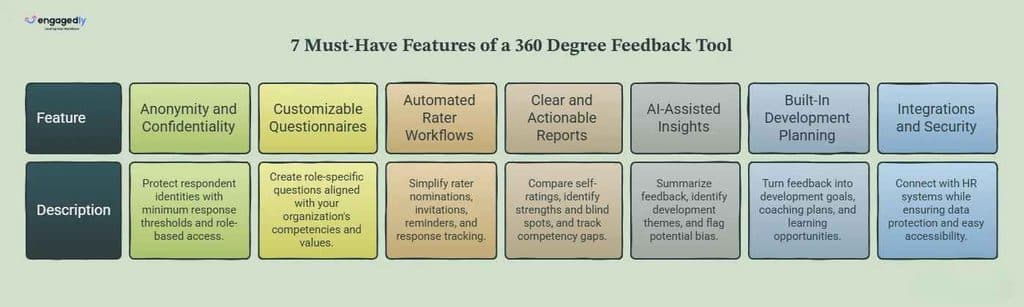
1. Anonymity and confidentiality controls
Honest feedback needs protection. A good tool hides who said what and stops anyone from working it out by elimination.
People soften criticism when they fear it can be traced back to them. A tool should make that safety structural rather than a promise in an email. Look for these capabilities.
Minimum respondent thresholds, so a rater group’s results stay hidden until enough people have replied (many teams use three to five, though the right number depends on team size)
Anonymous comments, with the option to show manager feedback as attributed
Role-based access, so HR sees what HR needs and managers see only their own reports
Plain-language notices telling raters who can see what
Small teams deserve special thought. If a manager has only two direct reports, a single comment is easy to guess. A good platform lets you merge small groups or hide them entirely. Tell raters how privacy works before the survey opens, because trust is won or lost in that first message.
2. Customizable questionnaires and competency frameworks
Your questions should match your culture, not a vendor’s template. Customization is the difference between feedback that feels relevant and a survey people rush through.
A tool should let you start from proven templates and then edit freely. Check for these options.
Question libraries by role and level, plus the freedom to write your own
A mix of rating scales and open-ended comments
Different question sets for managers, peers, direct reports, and external reviewers
Competency and value tagging, so results map to your leadership model
Wording matters as much as the software. Questions that ask raters to describe a situation, the behavior they saw, and its impact give recipients something concrete to work with. Our guide to giving feedback with the SBI model shows how that structure turns vague impressions into usable input. Ask the vendor whether you can build that structure into your question prompts.
Keep the survey short too. Raters often have several to finish, and a 15-minute questionnaire for every colleague guarantees rushed answers.
3. Flexible rater selection and automated workflow
A 360 cycle has dozens of moving parts, and running it from spreadsheets burns HR hours. The tool should handle the logistics so your team can focus on people.
Look for these workflow capabilities.
Rater nomination by the employee, manager approval, and HR override
Support for internal and external reviewers such as clients or vendors, which is what Engagedly’s 360 Feedback module is designed for
Automated invitations and reminders, with a live view of response rates
Scheduling for annual, semi-annual, or project-based cycles
Separate anonymity settings for each rater group
Response tracking deserves attention. If half your raters never reply, reports get thin and less trustworthy. A dashboard that shows who has not responded, without revealing anyone’s answers, lets HR nudge at the right time. If you already run structured reviews, check how the tool fits your wider performance management cycle, since a 360 round works best when it lands at a predictable point in that cycle.
4. Clear, actionable reports
The report is the part recipients actually see. If it is cluttered, nothing else matters.
Good reports turn raw scores into patterns. Look for these views.
Self-ratings compared with each rater group, so blind spots and hidden strengths stand out
Results by competency, with the highest and lowest items called out
Comment themes grouped together instead of a wall of text
Comparison with previous cycles
Team and organization roll-ups for HR, with individual data protected
That last point is where talent analytics earns its place. Leaders can spot patterns across teams, like a competency that is weak organization-wide, without exposing any one person’s feedback.
Reports should also help managers start a conversation. A recipient who gets scores with no guidance often feels judged. Look for coaching tips, discussion prompts, or a facilitator guide. If feedback feeds into formal reviews, our collection of performance review phrases and examples can help managers word themes constructively.
5. AI-assisted insights and bias checks
AI can save hours of comment analysis, but treat it as an assistant rather than a verdict. Capabilities vary widely between vendors, so ask to see them working on realistic sample data.
Useful AI-assisted features include these.
Summaries of open-text comments into strengths and development themes
Flags for biased or unprofessional language before it reaches a recipient
Detection of unusual rating patterns, such as one rater scoring everyone identically
Suggested development actions based on gaps in the report
Ask how the vendor handles your data. You should know whether feedback is used to train models, where it is processed, and whether you can switch AI features off. A human should review AI-generated summaries before they go to employees, since software can miss sarcasm, context, and cultural nuance.
Bias is worth taking seriously because raters carry it too, from recency effects to simple likability. No software removes it. The best tools make it visible so HR can coach raters and calibrate results.
6. Development planning built into the tool
Feedback without follow-up is just information. The most valuable feature is whatever happens after the report lands.
Strong tools connect results to action. Check for these links.
Individual development plans created directly from report themes
Goal setting tied to the competencies that came up
Coaching, mentoring, and learning recommendations
Reminders that check progress after 30, 60, and 90 days
In Engagedly, 360 insights can feed individual development plans, goals, and mentorship programs, and Growth Hub supports the ongoing development side, so the report becomes the start of a plan rather than the end of a project. Whatever tool you choose, run the same test. Can a manager and employee leave the debrief with two or three agreed actions already recorded?
This is the least exciting feature and the one most likely to cause pain later. Your 360 tool has to fit the systems you already use and handle sensitive data responsibly.
Check these basics.
HRIS integration or simple data import, so org charts and reporting lines stay current
Single sign-on and encryption, plus clear data retention and deletion policies
A mobile-friendly rater experience, since many raters will respond from a phone
Multi-language support if your workforce is global
Responsive onboarding and support, especially for your first cycle
Also ask whether the 360 tool sits inside a wider platform. Keeping 360 results alongside goals and performance reviews saves you from stitching together exports. If you are weighing platforms, our roundup of the best performance management systems gives a broader view of the market. Get security answers in writing, and send the security questionnaire to your IT team before you commit.
Quick checklist to take into vendor demos
Feature
Question to ask the vendor
Anonymity
What is the minimum number of responses before a rater group appears in a report?
Customization
Can we edit templates and use different questions for each rater group?
Workflow
Can employees nominate raters, and can managers approve them?
Reports
Can I see a real sample report for a small team?
AI and bias
Which AI features are included, and how is our data used?
Development
Can a development plan be created straight from the report?
Integrations and security
Which HR systems connect, and where is our data stored?
How to test a 360 degree feedback tool before you buy
Feature lists only get you so far. A short trial tells you much more. Work through these steps in order.
Define the purpose first. A development-only program and one tied to pay need different safeguards, so decide before the first demo.
Ask to see the rater experience, not only the admin screens. Raters decide whether your data is any good.
Open a sample report for a small team and check whether anonymity holds.
Pilot with one team of 15 to 30 people and track response rate, completion time, and how people felt about the process.
Walk a real manager through the debrief and development planning flow.
Then compare what you saw against the seven features above. A tool that handles most of them well and fits your budget and culture is a better pick than one with a long feature list you will never use.
Final thoughts
The right 360 degree feedback tool makes honest input safe to give, easy to read, and simple to act on. If a platform gets anonymity, flexible questions, smooth workflows, clear reports, careful AI support, development follow-through, and solid security right, you are most of the way there.
The tool supports your culture and does not replace it. Set a clear purpose, train raters and managers, and follow through on what you agree.
If you want to see how this works in practice, request a demo of Engagedly and we will walk you through building a 360 feedback cycle that fits your team.
Frequently asked questions
What are the key features of a 360 degree feedback tool?
The features that matter most are anonymity controls, customizable questionnaires, automated rater workflows, clear reports, AI-assisted comment analysis, development planning, and strong security and integrations. Each one affects whether raters are honest and whether recipients can act on what they read.
How many raters should a 360 degree review include?
There is no universal rule. Many practitioners aim for roughly eight to twelve raters per person, with at least three in each group so responses stay anonymous. Treat that as a common industry guideline rather than a fixed standard, and adjust it for small teams.
Should 360 degree feedback be used for pay or promotion decisions?
Most practitioners recommend using it for development first. Tying results directly to pay can push raters to inflate or sabotage scores. If you do use it in decisions, tell everyone upfront, treat it as one input among several, and review the data for bias.
Can a 360 degree feedback tool work for remote and hybrid teams?
Yes, and it can help. Remote managers see less day-to-day work, so input from peers and direct reports fills gaps. Look for a mobile-friendly rater experience and automated reminders so distributed teams can respond easily.
How often should we run 360 degree feedback?
Many organizations run it once a year or every six to twelve months for development. Between cycles, lighter check-ins and ongoing feedback keep the momentum going, so the 360 report does not become a once-a-year event.
How much does 360 degree feedback software cost?
Pricing varies by vendor, headcount, and whether 360 feedback is a standalone product or part of a wider performance platform. Ask for a quote based on your number of employees and how many cycles you plan to run each year.
Abhishek is an HR expert writer and growth marketing professional at Engagedly, with over 7 years of experience covering the HR tech space. His work focuses on creating well researched, practical, and authoritative content that helps HR leaders understand performance management, employee engagement, talent development, and workplace transformation.





 Innovative