Most HR playbooks were written for people who sit at desks. Then you walk onto a warehouse floor at 6 am and realize none of it applies.
Half of them have never logged into the HRIS. The engagement survey you spent three weeks building got a 9% response rate because it went out through a channel they can’t access.
Roughly 80% of the world’s workforce is deskless. This piece covers what actually moves the needle for frontline teams and how to pick technology that survives contact with a real shift schedule.
Where Frontline Management Breaks Down
The failures cluster in predictable places. Before fixing anything, it helps to name them honestly.
Communication that never arrives
If your default channel is email or an intranet behind a VPN, most frontline workers will never see it. The message physically cannot reach them during a shift where their phone is in a locker and their hands are full.
So updates get relayed through managers, verbally, at shift change. By the third retelling, the policy change about overtime approval has mutated into something legal would not recognize. Then people act on the mutation, and HR spends a month cleaning up.
Turnover that pay raises don’t fix
Frontline-heavy sectors bleed people. The reflex is to throw wage increases at it, and sometimes that’s genuinely the answer.
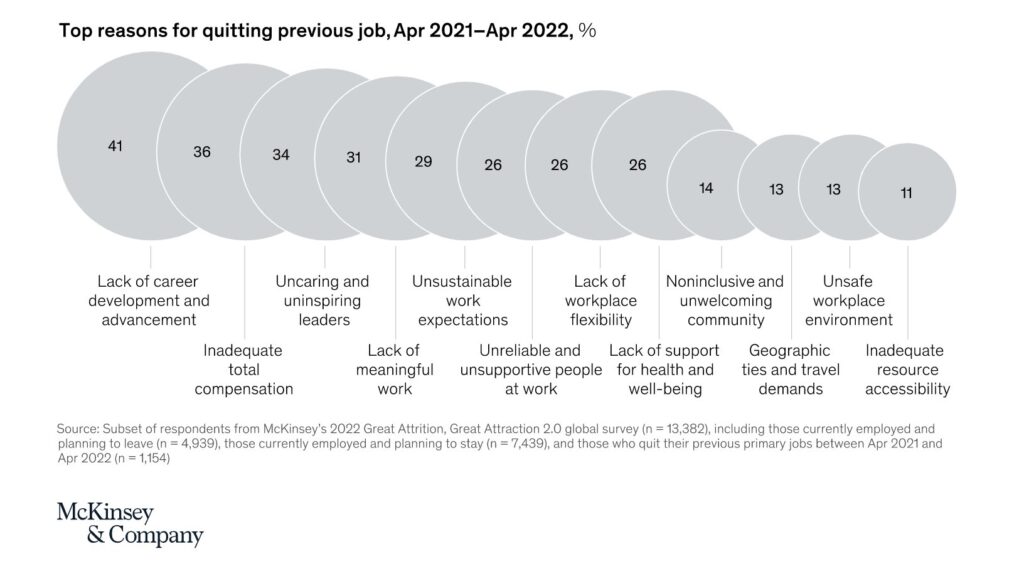
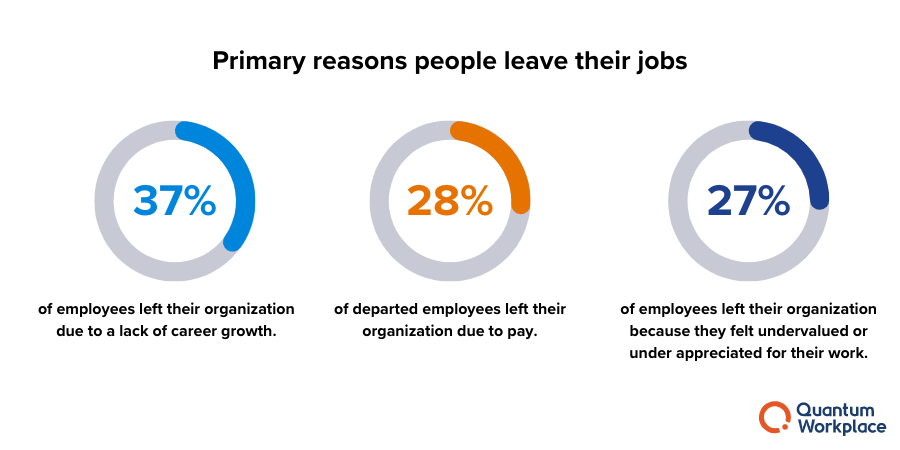
But McKinsey’s research found frontline workers cite lack of career advancement and feeling disrespected as top quit reasons, sitting right alongside pay.
You can out-pay a competitor and still lose people who’ve concluded the job goes nowhere.
Training nobody has time for
Shifts are tight. Coverage is thin. Pulling someone off the floor for a 90-minute e-learning module is a staffing problem, so it doesn’t happen, and the training backlog grows. The 2022 Microsoft Work Trend Index on frontline work found frontline employees want more technology and better training access and get enough of neither.
Underneath all three sits the culture problem. When communication, learning, and recognition all live in tools you can’t reach, the mission statement on the wall is just paint.
Engagement That Works on a Shift Schedule
Everything below shares one design constraint: it has to work for someone standing up, mid-shift, with ninety seconds to spare. If a program fails that test, it fails, full stop.
Structural inclusion
A frontline appreciation week is symbolic. A rotating council of workers from different sites and shifts who meet monthly with leadership, raise issues, and see documented follow-up on what changed is structural. One costs a banner. The other costs actual decision-making power, which is why most companies do the banner.
Do the council. Share back what changed within the month. The share-back is the entire mechanism; skip it, and the council becomes a complaint box with chairs.
Recognition at the speed of the work
A quarterly review means very little to someone working a register. What lands is recognition they can feel during the shift itself.
Two taps to recognize a teammate, not a form
Standup shout-outs and safety wins as micro-rituals built into the shift, where the work actually happens
Manager response within 24 hours when someone raises a concern, because a fast response is itself a form of respect
Voice notes instead of written submissions where literacy or language is a barrier
Physical tokens still carry weight too. Teams that mark safety milestones or service anniversaries with custom t-shirts give recognition a visible, lasting form that a notification never will, and workers wear the proof of it onto the floor.
Meet people on the device they already own
Walmart’s Me@Walmart app puts scheduling, communications, and tools directly on associate’s phones. The lesson generalizes: participation problems are usually access problems wearing a costume.
Short mobile updates with one clear call to action will outperform any beautifully formatted memo, every time, at any company size.
Retention: The Levers That Actually Hold People
Here’s where most programs underinvest, and it’s the section that deserves the most weight.
The fix is unglamorous, and it works: publish skill ladders for every frontline role, with pay transparency at each rung. Tie skill badges to real pay bumps and preferred shifts, not certificates.
Daniel Apke, Founder of Land Portal, a real estate investing platform, has built his company’s field-facing teams around this exact principle.
He says, “The people doing the ground-level work are the ones who understand the business best, and they know when a career path is real versus decorative. If someone can see the next rung and knows exactly what it takes to reach it, they stop scanning job boards. Ambiguity is what makes good people leave, not the work itself.”
Promote from within, visibly. One floor associate becoming a site supervisor does more for retention than any engagement campaign, because everyone watching just recalculated their own odds.
Compensation shaped for shift work
Base pay matters. So do the things that account for how shift work actually disrupts a life:
Earned wage access, so a car repair doesn’t become a payday loan
Transportation, parking, or childcare support
Predictable scheduling isn’t just kindness.
The manager multiplier
Gallup has found repeatedly that managers account for a huge share of variance in team engagement. On the frontline, this compounds because the manager is often the employee’s only human contact with the company.
Train them for the floor, not the classroom. Five-minute coaching conversations. Conflict resolution mid-shift, between two people who have to keep working together for six more hours. Micro-lessons a supervisor can absorb standing in a stockroom.
A frontline manager who handles those three things well is worth more to retention than the entire benefits brochure.
Technology That Survives the Floor
The rule is short. If a tool doesn’t fit in a worker’s pocket, it doesn’t exist for a deskless team.
Everything below assumes mobile-first and cloud-based, because anything else fails at the login screen.
The core stack:
Communication: mobile updates, SMS alerts, genuine two-way messaging. Broadcast-only tools train people to ignore them.
Scheduling: self-serve shift swaps, time-off requests, forecast visibility. Every swap that doesn’t require a manager is friction removed twice.
Learning: microlearning with offline mode, plus QR codes on equipment linking straight to the relevant SOP. Training at the point of task beats training in a portal.
Workflow: checklists, digital forms, safety reporting with photos or voice notes.
Recognition and feedback: one-tap kudos, pulse checks embedded in tools people already open daily.
AI without the fear
Frontline teams hear automation and hear layoffs. Address it directly, because dodging it kills adoption.
The honest framing: automation done right cuts busywork, not headcount. Smart scheduling that balances preferences against compliance rules. Shift handoffs auto-transcribed in multiple languages.
Task suggestions responding to real-time demand. Safety anomaly detection from photos or sensor data. All of it removes the repetitive load that burns people out, which is precisely the load nobody misses.
Gregor Emmian, Deputy Chief Digital Growth Officer at Rise, a fintech platform focused on global workforce payments, sees the same pattern in how frontline teams respond to new tools.
He says, “Adoption follows trust, and trust follows transparency. When workers understand that automation is taking the paperwork and not the paycheck, usage climbs on its own.
The rollouts that fail are almost always the ones where leadership announced the tool but never explained the intent behind it.”
Rollout discipline
Co-design with frontline input from day one, before procurement, not after. Pilot on one site or one shift. Train on the floor in ten-minute bites. Support BYOD securely and provide devices where BYOD isn’t fair to ask.
And explain the why: what changes, what doesn’t, and exactly how the data gets used. Skip that last conversation and the workforce will invent a surveillance story on your behalf.
Measuring Whether Any of This Worked
Metrics only matter if they change decisions. A dashboard nobody acts on is decoration.
Track a spread across the areas that actually predict outcomes:
Engagement: pulse response rates, belonging index, recognition frequency
Retention: overall and regrettable attrition, 30/60/90-day turnover, internal mobility rate
Scheduling: shift fill rate, schedule stability, voluntary vs. involuntary overtime
Safety and quality: incident rate, near-miss reporting, first-time-right completion
Learning: time-to-competency, completion rates, skills earned per FTE
Adoption: active usage, feature uptake, time saved per task
Put the numbers on mobile dashboards. Review them in weekly standups, not quarterly business reviews. And keep pairing the data with stories from the floor, because a 4% dip in schedule stability reads differently once you’ve heard what it did to someone’s childcare arrangement.
What’s Next
Skills-based staffing, portable credentials, AI copilots, AR-assisted training. All of it is moving from pilot to practice, and all of it hangs on the same thread: access. Tools, learning, and voice in every worker’s pocket.
Start small. Fix the channel before the campaign. Measure what matters, expand what works, and keep listening to the people closest to the work, because the best ideas in this space have always come from a shift-change conversation, not a boardroom.
See how Engagedly helps you put engagement, recognition, and growth tools directly in your frontline worker’s hands.
HR teams are drowning in data and somehow still making gut calls on their most expensive decisions. Turnover, engagement, skill gaps, these problems aren’t new, but the tools for tackling them have gotten dramatically better. The challenge is that most organizations haven’t caught up.
The numbers illustrate the gap well. Organizations with mature HR analytics programs save an average of $1.96 million annually and see 367% ROI within 24 months, according to research compiled by Second Talent. Yet while 76% of organizations have some form of HR analytics, only 21% have advanced capabilities that actually inform decisions.
That gap is expensive. Without predictive analytics, you’re finding out someone was a flight risk after they’ve already accepted another offer. Companies using predictive HR analytics show 41% better talent decisions and 32% faster problem resolution, per the same research.
Meanwhile, the HR analytics software market itself hit $4.1 billion in 2026, growing at roughly 10.8% annually, a sign that plenty of organizations are finally investing.
This guide breaks down the 20 best HR analytics software options available in 2026, including honest pros and cons for each. No tool is perfect for everyone, and knowing where a platform falls short matters just as much as knowing what it does well.
The best HR analytics softwares collect, process, and visualize workforce data so you can understand patterns before they become problems. The difference between basic HR reporting and real analytics is the difference between knowing your turnover rate is 14% and understanding why your best engineers leave after 18 months, what predicts it, and which interventions actually work.
Traditional reporting tells you what happened. Analytics shows you why it happened, what’s likely to happen next, and what to do about it.
Cloud-based analytics platforms now deliver 34% faster insights and 28% lower costs compared to older on-premise solutions, which has removed one of the biggest barriers to adoption for mid-market teams.[3] That said, implementation still trips up a lot of organizations: 74% face data quality problems, 69% lack internal analytics skills, and 63% struggle with system integration. The platform choice matters, but so does the data going into it.
What to Look for Before You Buy
A few features separate genuinely useful platforms from expensive dashboards:
1. Data integration breadth.
If the platform can’t connect to your HRIS, ATS, payroll system, and engagement surveys, you’re going to spend more time exporting CSVs than analyzing data. Ask about pre-built connectors specifically for the tools you already use.
2. Predictive vs. descriptive capabilities.
Most platforms can show you what happened. Fewer can tell you what’s likely to happen. If turnover prediction or skills forecasting matters to you, verify these features actually exist in your tier, not just in enterprise pricing.
3. Who actually uses it day-to-day.
A platform built for data scientists is useless if your HR team is the one who needs to pull reports on Monday morning. Self-service usability matters more than raw analytical power for most teams.
4. Role-based access controls.
HR needs full data. Managers need team-specific views. Executives want summary dashboards. Platforms that handle all three cleanly are much easier to roll out organization-wide.
5. How it connects to action.
The best platforms don’t stop at insight. They link analytics to workflows so you can actually do something about what you’re seeing.
TL;DR: Top 20 HR Analytics Software (2026)
Platform
Best For
Starting Price
Engagedly
Analytics embedded into performance, engagement, learning workflows
$2/user/mo
Visier
Deep predictive modeling for large enterprises
Custom
Crunchr
Self-serve analytics without a data science team
$4.49/user/mo
One Model
Flexible data modeling with unlimited integrations
Custom
Orgnostic
Unified metrics layer across multiple HR systems
Custom
Workday People Analytics
Workday HCM customers
Bundled
SAP SuccessFactors Analytics
Large SAP-based enterprises
Custom
Oracle Fusion HCM Analytics
Oracle HCM customers with global operations
Custom
UKG Pro Analytics
Hourly workforce and scheduling analytics
Custom
Dayforce Analytics
Real-time shift and labor management
Custom
ADP Workforce Analytics
ADP customers needing integrated analytics
Custom
Microsoft Viva Insights + Glint
Collaboration and engagement analytics in Microsoft 365
$2/user/mo
Qualtrics EmployeeXM
Employee listening connected to business outcomes
Custom
Culture Amp
Engagement analytics with strong manager dashboards
Custom
Lattice Analytics
Mid-market performance and engagement analytics
$11/seat/mo
HiBob People Analytics
HRIS + analytics in one for growing companies
Custom
Rippling Reporting
Unified HR and IT analytics for tech companies
Custom
Paylocity Analytics
SMB and mid-market teams using Paylocity
Custom
Paycor Workforce Analytics
Small businesses wanting simple workforce reporting
Custom
BambooHR Analytics
Small teams (under 500 employees)
$10/employee/mo
The 20 Best HR Analytics Software Platforms
1. Engagedly
Engagedly is different from most analytics tools in one specific way: the analytics are built into the workflows rather than sitting alongside them. Performance reviews, OKR tracking, engagement surveys, and learning data all feed into the same analytics layer, which means you’re not trying to reconcile data from four different systems when you want to understand why a team’s performance scores dropped.
HR teams get real-time views of performance trends, engagement risks, skill gaps, and manager effectiveness in one place. Marissa AI surfaces patterns and flags issues early-stage flight risk indicators, manager effectiveness outliers, goal completion gaps, and recommends actions rather than leaving the interpretation entirely to the user. For teams that don’t have a dedicated people analytics function, this makes a real difference.
Dashboards can be filtered by team, role, tenure, or performance level. Access controls let you show managers their team view without exposing org-wide data. Reports are designed to be readable by executives who aren’t HR specialists, which is often the harder problem to solve.
If you’re thinking about where analytics fits into your broader performance management system, Engagedly’s approach is worth understanding specifically because it doesn’t treat analytics as a separate reporting module.
Key features: Actionable people analytics across performance, engagement, goals, and learning; AI-powered insights via Marissa AI; custom and role-based reporting; visual dashboards; integrated talent analytics
✅ Pros
  - Analytics and action live in the same platform
  - No need to export or reconcile data across tools
  - Marissa AI surfaces insights without requiring data expertise
  - Strong support for organizations at different analytics maturity levels
  - Highly customizable dashboards for different stakeholder types
⚠️ Cons
  - Organizations that want raw workforce modeling independent of HR workflows may prefer a specialist analytics tool
  - Less suitable as a standalone analytics layer on top of a complex multi-HRIS environment
Pricing: Modular pricing starting at $2 to $8 per user per month, billed annually. Minimum annual commitment of $7,500 with optional add-on suites.
2. Visier
Visier built its reputation by solving one specific problem really well: giving large enterprises the ability to ask complex, multi-variable questions about their workforce and get reliable answers. What combination of factors predicts attrition in the engineering team? How will a planned restructuring affect diversity metrics over 18 months? These are the kinds of questions Visier handles better than almost anything else on the market.
The 2023 acquisition of Yva.ai added real-time sentiment analysis from Slack and Microsoft Teams, which moves Visier beyond purely structured HR data into passive signal collection. That’s useful for organizations looking to complement survey data with behavioral signals. A Fortune 500 company that deployed Visier for attrition modeling reportedly reduced turnover by 17% by intervening with at-risk employees earlier.
The trade-off is complexity and cost. Visier isn’t a self-serve tool. It works best for organizations that have dedicated analytics resources and the data infrastructure to support sophisticated modeling.
✅ Pros
  - Industry-leading predictive modeling and attrition forecasting
  - Strong scenario planning for workforce restructuring
  - Real-time sentiment analysis from collaboration tools (via Yva.ai)
  - Scales well across large, multi-system enterprise environments
⚠️ Cons
  - Significant cost and implementation complexity
  - Requires dedicated analytics team to get full value
  - Not practical for SMB or mid-market without analytics maturity
Pricing: Custom, quote-based. Typically targets medium-to-large enterprises.
3. Crunchr
Crunchr’s pitch is that you shouldn’t need a data scientist to understand your workforce data. The platform is designed for HR professionals who know what questions they want to answer but don’t want to write SQL to get there. Self-service dashboards, drag-and-drop exploration, and visual outputs that actually make sense to non-technical users.
The more recent addition of AI-suggested interventions pushes Crunchr into prescriptive territory. Rather than just showing you that engagement in a certain team has dropped, the platform will suggest what to do about it based on patterns in the data. That’s useful for HRBPs who are managing multiple business units and can’t spend hours interpreting every signal themselves.
✅ Pros
  - Minimal technical barrier to entry
  - AI-suggested interventions go beyond reporting
  - Good balance of analytical power and HR-friendly usability
  - 7-day free trial available
⚠️ Cons
  - Advanced modeling depth is limited compared to Visier or One Model
  - May not satisfy organizations with dedicated analytics teams who want more control
Pricing: Starting at $4.49 per user per month. Volume discounts available for larger teams.
4. One Model
One Model is for organizations that need maximum flexibility and control over their data models. It connects to any HR system, financial platform, or external data source, and gives data-savvy HR teams the ability to build custom models, define their own business rules, and run advanced statistical analysis including machine learning and regression modeling.
Clients like Squarespace, Santander, and Deloitte have used One Model to build analytics capabilities that no packaged product could replicate out of the box. The platform’s AI models are fully transparent, which matters for organizations in regulated industries or those with governance requirements around algorithmic decision-making.
✅ Pros
  - Unlimited data source integration via flexible APIs
  - Full transparency into AI models and business rules
  - Best-in-class for organizations with custom analytics requirements
  - Strong data governance controls
⚠️ Cons
  - Requires dedicated technical analytics resources to operate
  - Can be overwhelming without clear data strategy in place
  - Significant implementation investment
Pricing: Tiered, quote-based pricing across Essentials, Enterprise, and Data Mesh editions.
5. Workday People Analytics
If your organization already runs Workday HCM, People Analytics is the path of least resistance for workforce insights. The integration is seamless, definitions are consistent across HR and finance, and data flows through the ecosystem without manual intervention. Cross-functional reporting that spans headcount, compensation, and performance is genuinely strong here.
✅ Pros
  - Native integration with Workday HCM means no data reconciliation
  - Consistent metrics across HR, finance, and planning
  - Strong cross-functional reporting capabilities
⚠️ Cons
  - Only makes sense if you're already in the Workday ecosystem
  - Adding it outside Workday is not practical
  - Advanced analytics features can require significant configuration
Pricing: Bundled with Workday HCM. Contact Workday for standalone or add-on pricing.
6. SAP SuccessFactors Analytics
SAP has leaned into generative AI for analytics with features like automated report generation and AI-assisted succession planning. For organizations running SAP SuccessFactors at global scale, the analytics layer handles compliance reporting across jurisdictions, workforce forecasting, and reskilling need identification. A global tech firm reportedly used SAP’s workforce analytics to forecast reskilling requirements and reduce training costs by 30%.
✅ Pros
  - Deep compliance coverage across global markets
  - Strong integration across the broader SAP enterprise suite
  - Generative AI features for automated report creation
⚠️ Cons
  - Implementation complexity and cost are high
  - Best value only for existing SAP SuccessFactors customers
  - Interface can feel dated compared to newer analytics tools
Pricing: Custom enterprise pricing.
7. Oracle Fusion HCM Analytics
Oracle Fusion HCM Analytics handles complex global compliance requirements alongside workforce planning and predictive modeling. It integrates tightly with Oracle’s broader enterprise application suite, which matters for large organizations where HR data needs to connect to ERP, finance, and supply chain planning. The platform suits organizations with global operations and genuine multi-system complexity.
✅ Pros
  - Handles global compliance and regulatory reporting well
  - Strong integration across Oracle enterprise suite
  - Advanced workforce planning capabilities
⚠️ Cons
  - High implementation cost and timeline
  - Predominantly useful only for Oracle HCM customers
  - Steep learning curve for non-technical HR teams
Pricing: Custom, contact Oracle for pricing based on module selection.
8. UKG Pro Analytics
UKG Pro Analytics is purpose-built for organizations with large hourly workforces. Scheduling, attendance, labor cost modeling, and compliance analytics are where it shines. If you’re running retail, healthcare, or hospitality operations where shift management and overtime costs eat into margins, this platform speaks your language in ways general HR analytics tools don’t.
✅ Pros
  - Excellent for hourly workforce and shift analytics
  - Strong labor cost modeling and compliance features
  - Deep scheduling intelligence
⚠️ Cons
  - Less suited for primarily salaried or knowledge worker organizations
  - Engagement and performance analytics are not its strength
  - Pricing and implementation geared toward enterprise accounts
Pricing: Custom pricing.
9. Dayforce Analytics
Dayforce focuses on real-time analytics for complex shift environments. A logistics company deploying Dayforce to monitor field staff engagement reportedly reduced absenteeism by 18%. The real-time data layer lets managers respond to scheduling gaps, compliance issues, and labor cost overruns as they happen rather than after the fact.
✅ Pros
  - Real-time data is genuinely useful for shift-based operations
  - Strong compliance tracking features
  - Good labor cost visibility
⚠️ Cons
  - Engagement and talent analytics are limited
  - Complex implementation for mid-market organizations
  - Custom pricing makes cost evaluation harder without a demo
Pricing: Custom, based on organization size and module selection.
10. ADP Workforce Analytics
For organizations already on ADP Workforce Now, the analytics layer is a natural extension. Because ADP holds payroll, benefits, time, and HR data in one place, the analytics benefit from unusually complete data without requiring integrations. The benchmarking feature, which lets you compare your workforce metrics against market data, is genuinely useful for compensation and headcount planning.
✅ Pros
  - Comprehensive data from payroll, time, and HR in one system
  - External benchmarking against market data
  - Straightforward for existing ADP customers
⚠️ Cons
  - Limited value for organizations not using ADP
  - Analytics depth is more operational than strategic
  - Less competitive on predictive capabilities compared to dedicated platforms
Pricing: Custom, based on ADP module selection and employee count.
11. Microsoft Viva Insights + Glint
Viva Insights does something few HR analytics tools can: it uses Microsoft 365 data (meeting patterns, email habits, Teams usage) to show you how work actually gets done. Add Glint’s engagement surveys and you have a combination of passive signal collection and active listening that tells a fairly complete story about employee experience. For organizations already deep in the Microsoft ecosystem, the integration cost is minimal and the collaboration analytics are genuinely unique.
  - Unique collaboration pattern analytics not available elsewhere
  - Strong fit for Microsoft 365 organizations
  - Burnout and wellbeing signals from actual work patterns
  - Viva Glint adds robust engagement listening
⚠️ Cons
  - Value drops sharply outside the Microsoft ecosystem
  - Employee privacy concerns around passive data collection require careful change management
  - Not a full HR analytics replacement — better as a complement
Pricing: Viva Glint starts at $2 per user per month. The full Viva Suite is $12 per user per month.
12. Qualtrics EmployeeXM
Qualtrics built its reputation on experience management, and EmployeeXM extends that into HR analytics. The platform is best at listening: structured surveys, open-ended text analysis, pulse checks, and 360-degree feedback. The NLP-driven text analytics catch themes in open-ended responses that structured questions would miss entirely. The real value is in connecting those listening signals to other HR metrics, so you can see how engagement scores relate to performance outcomes or attrition.
This platform is worth considering if you’ve ever had a problem where your exit survey data lived in one system, and your performance data lived in another, making it impossible to answer “did the people who left show disengagement signals six months earlier?”
✅ Pros
  - Industry-leading employee listening and survey capabilities
  - Advanced text analytics for open-ended responses
  - Strong at linking experience data to business outcomes
⚠️ Cons
  - Primarily an experience platform — not a full HR analytics suite
  - Can be expensive for organizations that only need basic engagement surveys
  - Implementation and configuration require meaningful time investment
Pricing: Usage-based, custom pricing.
13. Culture Amp
Culture Amp is engagement-first, which is either a perfect fit or a limitation depending on what you need. The platform makes it easy to run surveys, track sentiment over time, benchmark against comparable companies (its dataset is substantial), and give managers action plans based on their team’s results. Manager dashboards are well-designed — specific enough to be useful, simple enough that managers who are skeptical of HR software will actually look at them.
For organizations that prioritize engagement measurement and want managers to be active participants in acting on data, Culture Amp is hard to beat at its price point. Understanding how to interpret engagement survey results becomes much easier with the guidance built into the platform.
✅ Pros
  - Strong engagement benchmarking against industry peers
  - Manager-friendly dashboards and action plans
  - Good visualization of sentiment trends over time
⚠️ Cons
  - Engagement and development focus means limited workforce planning capabilities
  - Organizations needing broader HR analytics will need additional tools
  - Pricing can add up when combining engagement, performance, and development modules
Pricing: Flexible, quote-based by organization size and modules.
14. Lattice Analytics
Lattice targets mid-market companies that want performance and engagement analytics in one platform without enterprise-tier pricing or complexity. The analytics make it easy to spot correlations — which managers give meaningful feedback, where goal alignment is weakest, where performance trends diverge from engagement scores. It’s a good fit for companies that have outgrown basic reporting but aren’t ready for the complexity of dedicated analytics platforms. Connecting this to a strong performance management system makes the analytics far more useful.
✅ Pros
  - Good integration of performance, goals, and engagement analytics
  - Intuitive interface with relatively low learning curve
  - Competitive pricing for mid-market teams
⚠️ Cons
  - Analytics depth is limited compared to enterprise-focused platforms
  - Advanced analytics modules cost extra on top of base pricing
  - Less suitable for organizations with complex multi-system data environments
Pricing: Talent Management and Performance plans start at $11 per seat per month. Advanced analytics add-ons available at $4 to $6 per seat per month.
15. HiBob People Analytics
HiBob combines a clean, modern HRIS with practical analytics for growing companies. Because the core HR data and analytics live in the same system, there are no integration headaches, and you’re not waiting for data sync jobs to run. The analytics are practical rather than deep: headcount trends, attrition, compensation insights, and performance data. For a fast-growing company that needs both an HRIS and basic workforce analytics, Bob removes the need to buy and connect separate systems.
✅ Pros
  - HRIS and analytics in one eliminates integration complexity
  - Modern, intuitive interface that HR and employees actually use
  - Good for companies scaling quickly
⚠️ Cons
  - Analytics capabilities are functional but not deep
  - Organizations needing predictive or advanced modeling will outgrow it
  - Custom pricing makes it harder to compare costs upfront
Pricing: Custom pricing through HiBob’s HCM plans, tailored by size and modules.
16. Rippling Reporting
Rippling’s position spanning HR and IT creates analytics possibilities that pure HR tools can’t touch. You can connect employee productivity to software usage, track onboarding tech provisioning, and see total cost of employment including software licenses alongside compensation. For tech-forward companies where the lines between HR and IT data are deliberately blurry, this is genuinely useful. For everyone else, it’s probably more than needed.
✅ Pros
  - Unique HR/IT cross-functional analytics
  - Strong total cost of employment visibility
  - Good for globally distributed teams using Rippling's EOR and payroll
⚠️ Cons
  - HR analytics depth is secondary to the IT and operational capabilities
  - Best value only if you're using Rippling's broader platform
  - Less competitive on engagement or performance analytics specifically
Pricing: Modular, custom pricing based on employee count and enabled products.
17. Paylocity Analytics
Paylocity offers AI-powered workforce analytics as part of its HR and payroll platform. The analytics focus on what small to mid-market HR teams need most: turnover trends, headcount analysis, compensation benchmarking, and time tracking patterns. It’s not trying to be Visier. It’s trying to be useful for a 200-person company that doesn’t have a people analytics team.
✅ Pros
  - Included with the core platform, no separate analytics purchase needed
  - User-friendly for non-technical HR teams
  - AI features are practical rather than overhyped
⚠️ Cons
  - Limited value for organizations not using Paylocity for HR/payroll
  - Analytics depth is constrained by the SMB focus
  - Predictive capabilities are basic
Pricing: Custom quotes based on employee count and modules.
18. Paycor Workforce Analytics
Paycor keeps HR analytics simple, which is the right call for its market. Pre-built report templates cover the metrics small businesses care about most: headcount, turnover, demographics, overtime costs, and basic performance trends. There’s no analytics expertise required to get started. For a 50-person company moving off spreadsheets for the first time, this is probably more than enough.
✅ Pros
  - Easy to use without any analytics background
  - Good template library covers common use cases out of the box
  - Practical for small business HR teams
⚠️ Cons
  - Limited depth for organizations that need anything beyond basic reporting
  - No meaningful predictive capabilities
  - Best suited for sub-500 employee organizations
Pricing: Custom, based on company size and HR/payroll module selection.
19. BambooHR Analytics
BambooHR delivers what small teams actually need from analytics: basic headcount visibility, turnover tracking, demographic breakdowns, and performance trends, without requiring any technical know-how to operate. If your organization is under 500 people and you’re still running HR out of spreadsheets, BambooHR Analytics is a practical starting point. It won’t predict attrition or model workforce scenarios. It will tell you how many people are in each department and what your 90-day turnover looks like.
✅ Pros
  - Very accessible for small teams without dedicated HR analytics resources
  - Included in BambooHR plans without a separate purchase
  - Quick to implement and start using
⚠️ Cons
  - Not suitable for organizations needing advanced or predictive analytics
  - Limited customization compared to standalone analytics tools
  - Organizations over 500 employees will likely outgrow the capabilities
Pricing: Included in BambooHR plans starting at $10 per employee per month. Advanced features available in higher tiers.
How to Choose the Right Platform
The most common mistake in HR analytics software selection is buying for where you want to be rather than where you are. A platform with sophisticated predictive modeling is worthless if your team can’t maintain the data quality it requires, or if nobody actually looks at the outputs.
1. Start with analytics maturity.
If you’re moving from spreadsheets, prioritize ease of use and quick wins. Crunchr, HiBob, or BambooHR are better starting points than Visier or One Model. If you already have an analytics function and clean data infrastructure, you have more options.
2. Map your existing tech stack honestly.
Organizations deeply invested in Workday, SAP, or Oracle should evaluate those vendors’ analytics offerings seriously before buying standalone tools. The integration advantage is real. Organizations with messier, multi-vendor stacks might find a tool like Orgnostic valuable as a unification layer.
3. Be specific about what you’re solving for.
Turnover prediction, engagement measurement, skills gap analysis, and workforce planning require different capabilities. Don’t evaluate platforms generically. Know your top two or three use cases and test those specifically.
4. Account for the total cost honestly.
Subscription fees are often the smallest part of the real cost. Implementation, data migration, training, and ongoing support add up. Some platforms that look expensive on paper deliver value faster than cheaper alternatives that require months of configuration.
Most failed HR analytics implementations have the same root causes:
1. Data quality problems are ignored until too late.
No analytics platform fixes bad underlying data. Audit your data quality, establish governance processes, and clean critical fields — job codes, departments, hire dates — before implementation, not after.
2. Trying to solve everything at once.
Identify two or three high-value use cases, prove value there, then expand. Teams that try to do everything simultaneously usually end up doing nothing well.
3. Treating it as an IT project.
Effective analytics requires collaboration between HR, IT, finance, and business leaders. If HR doesn’t own the outcomes and business leaders don’t trust the data, the investment doesn’t pay off regardless of platform quality.
4. No change management for managers.
Data threatens people who are used to making decisions based on intuition. Investing in manager training and showing how analytics helps them specifically, rather than monitors them, is the difference between adoption and shelfware. See our post on common leadership challenges for related context on building a data-driven management culture.
What’s Changing in 2026
The HR analytics space is moving in a few directions worth watching:
1. Agentic AI is arriving.
2026 has seen the first wave of agentic AI in HR, where AI systems don’t just surface insights but take or recommend specific actions: flagging at-risk employees and drafting retention conversation guides, identifying skills gaps and suggesting specific learning paths, modeling headcount scenarios, and summarizing trade-offs for leadership.
This shift is already showing up in usage data – Capterra found that 75% of organizations using HR/talent analytics software are actively leveraging AI features within it, suggesting adoption of agentic capabilities is running ahead of most platforms’ marketing.
This goes beyond the “AI-assisted insights” that platforms have been advertising for the past two years. See our post on AI’s impact on HR for a deeper look.
2. Regulatory pressure on algorithmic HR decisions is real.
Colorado’s AI Act, effective June 2026, adds specific governance requirements for AI used in employment decisions. The EU AI Act treats many HR analytics applications as high-risk systems requiring documentation, transparency, and human oversight.
Organizations using AI-driven attrition prediction, performance scoring, or hiring recommendations need to understand these obligations, not just the software vendors. Our coverage of AI ethics in HR is directly relevant here.
3. Skills-based analytics is growing.
As more organizations move toward skills-based workforce models, analytics platforms are adding capabilities to map current skill inventories, identify gaps, and model what reskilling or hiring needs to fill them. This is an area where most current platforms are still catching up. Connecting this to talent management strategy is where the real long-term value lies.
4. The market is consolidating.
The HR analytics software market reached $4.1 billion in 2026 and is projected to hit $6.13 billion by 2030. Expect more acquisitions and platform consolidation as larger vendors absorb specialized analytics players.[4]
Bottom Line
The right HR analytics platform depends on where your organization is, not where you aspire to be. Large enterprises with dedicated analytics teams and complex data environments have different needs than mid-market companies that just want to stop making headcount decisions based on gut feel.
If you want analytics embedded directly in your HR workflows, performance, engagement, learning, and goals all connected, Engagedly is designed around that problem. If you need best-of-breed predictive modeling as a dedicated analytics layer, Visier is the category leader. For self-service analytics without the technical overhead, Crunchr is worth a look.
Before you choose, get clear on your top two or three use cases, be honest about your data quality, and pressure-test the usability with the people who will actually use it every day, not just the technical evaluators. The platform that gets used consistently will always outperform the one with better features that sits unused.