Using Talent Data to Forecast Skill Gaps Before They Hit a Project: 8 Steps to Take Right Now

Skills gaps rarely announce themselves as a missing qualification on a workforce spreadsheet. They surface through missed deadlines, repeated rework, stalled projects, and high performers quietly taking on responsibilities outside their roles. By the time the gap becomes obvious, it is often already costing the business time, money, and momentum.

At its simplest, a skill gap is the difference between the capabilities a project demands and what your workforce can currently deliver. But this is no longer an occasional hiring problem. McKinsey found that 87% of companies are already experiencing skill gaps or expect to face them within a few years. The World Economic Forum also projects that 44% of skills will be disrupted within five years. Any workforce plan that assumes capabilities will remain static is built for a reality that no longer exists.

What Talent Data Actually Is

Talent data is any signal about what your people can do and how fast that picture is moving:

  • Performance reviews
  • Skills assessments
  • Certifications 
  • Learning completions
  • Internal mobility history
  • Engagement surveys
  • 360-degree feedback

Each of these alone is a snapshot, and snapshots lie. 

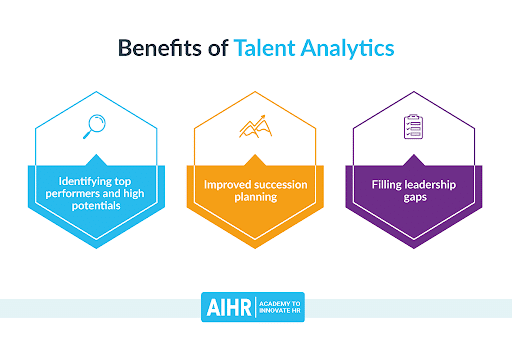
Benefits of Talent Analytics

Image Source

A performance review tells you the outcome, not which skills produced it.

An LMS completion tells you someone clicked through a course. Layered together, these sources start behaving like a map, and a map is what lets you solve the right problem instead of the loudest one.

Denys Hukov, Chief Growth Officer at Yalantis, staffs complex product teams across IoT, manufacturing, and fintech and has watched this play out across dozens of client engagements.

He says, “The teams that get blindsided by skill gaps have performance reviews, certifications, and training records all sitting in separate systems that nobody reads together. 

The moment you connect those sources, gaps stop being surprises. You can see a capability thinning out six months before a project fails, and six months is enough time to do something about it.”

Step 1: Run a Real Skills Inventory

Start with what you have. Not what the org chart implies you have. What you actually have.

Most teams skip this because it’s tedious and the payoff isn’t immediate. Then they buy training for skills that already exist on the bench and miss the ones that don’t.

Bryan Henry, President of PeterMD, has had to quickly build specialized clinical and operations teams while expanding across states with varying licensing requirements.

He says, “When you scale fast, the temptation is to hire for every gap you feel. We stopped and inventoried what our existing clinicians and staff could actually do, including things that never appeared in their job descriptions. Half the capabilities we thought we needed to recruit for were already in the building. The inventory paid for itself before we finished it.”

A few things that make the inventory worth trusting:

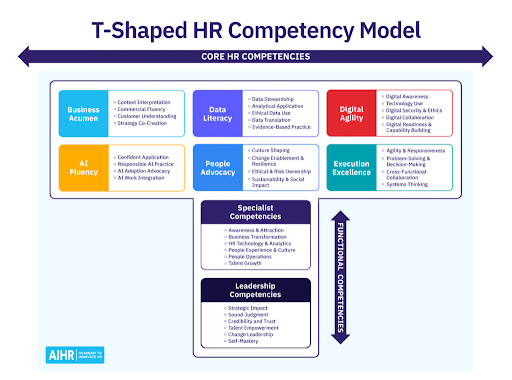
Image Source

  • Use a shared skills taxonomy people recognize. If the skill names don’t match how people describe their own work, self-ratings turn into noise.
  • Blend methods. Self-assessments measure confidence. Manager reviews measure perception. Work samples measure reality. You want all three, because the truth sits in the disagreement between them.
  • Mine what already exists. Performance reviews, certifications, LMS records. There’s more signal in your existing systems than you think.
  • Capture recency, not just proficiency. Someone who shipped with a framework two years ago is not deployable on it tomorrow. Skills rot.

Step 2: Put Predictive Analytics to Work

Historical talent data projected forward tells you where capability will rise, stall, or erode. That’s the difference between seeing the storm on radar and standing in it.

Gregor Emmian, Deputy Chief Digital Growth Officer of Rise, a fintech platform where product cycles move fast, treats forecasting as a survival skill rather than an HR exercise.

He says, “In fintech, the skills you need next year are shaped by regulation and technology shifts you can already see coming if you bother to look. We model our talent data against our roadmap the same way we model market risk. 

When the projection shows a competency concentrated in three people, two of whom are flight risks, that is not an HR footnote. That is a business exposure with a timeline attached.”

In practice, this means letting a skills platform like Eightfold, Gloat, or SkyHive do the inference work, or even just building a Power BI dashboard that shows skill depth by team and time. The tooling matters less than the habit.

And pair internal signals with external ones: if the roadmap says AI features, you should be tracking GenAI, model governance, and data privacy skills now, not when the sprint starts.

One caution. Validate the models for bias, and be transparent with employees about how their data gets used. A forecasting system people distrust gets fed garbage, and then it forecasts garbage.

Step 3: Plan Against Several Futures, Not One

You don’t get one future. You get a set of plausible ones, and your workforce has to survive whichever arrives.

Build three or four scenarios tied to actual strategy. 

One assumes fast AI adoption. One assumes tighter regulation. One assumes a market shift that changes what you sell. 

Concrete versions work better than abstract ones.

A custom print shop that suddenly wins a corporate uniform contract needs someone who can source blank apparel at volume, negotiate with suppliers, and manage fulfillment timelines, and none of those skills were on the radar when the business was doing one-off orders. That’s what a scenario surfaces: the capability requirements hiding inside a plausible tomorrow.

For each scenario, list the must-have skills and the roles that carry them. The overlaps tell you where to invest no matter what. The divergences tell you where to stay flexible: cross-train rather than hire, partner rather than build.

Step 4: Name Your Load-Bearing Roles

Not every role has equal leverage. Some are structural.

The exercise is quick. For each role, ask: if this underperforms for one sprint, what breaks? 

If the answer is “nothing visible,” fine. If the answer is “the release,” you’ve found a load-bearing role, and it needs three things: a proactive coverage plan, documented knowledge, and at least one cross-trained backup.

Protecting a few pillars beats spreading development budget evenly across everything. Even coverage feels fair. It isn’t a strategy.

Step 5: Turn Every Gap Into a Pathway

Identification without action is a report. Reports don’t close gaps.

Every named gap gets a pathway, an owner, and a timeline. And the method has to fit the skill:

  • Technical depth: Structured courses and labs (Coursera, Pluralsight, vendor academies), but always paired with a real deliverable. A course completion without a shipped artifact is a receipt, not a skill.
  • Leadership and influence: Mentorship, peer coaching, live practice. Nobody learns to hold a difficult room from a video module.
  • Emerging skills: Short sprints, hack weeks, anything hands-on and slightly uncomfortable.
  • Internal mobility: Rotations and stretch assignments. LinkedIn’s research shows employees who make internal moves stay longer, which means every skill you build compounds instead of walking out the door.

Step 6: Make Learning a Habit, Not a Campaign

Training closes a gap once. Culture keeps it closed.

The mechanics are unglamorous. Blocked calendar time that leaders visibly respect. Skill achievements mentioned in town halls. Growth tied to real internal opportunity, not just a certificate and a handshake. A monthly show-and-tell where someone demos what they learned.

Small rituals shift the default. When people see that building skills leads somewhere, learning stops being a mandate and becomes ambient.

Step 7: Check Whether the Skills Show Up in the Work

The plan you launch is rarely the plan you finish with.

Set milestones, but measure the right thing. Course completions are inputs. The question is whether the new capability appears in actual work:

  • Did cycle time drop after the team learned the framework? 
  • Did defect rates fall? 
  • Did the person who took the stakeholder training actually get put in front of stakeholders, and did it go better?

Validate with peer reviews, demos, and customer outcomes. Then close the loop with the learners themselves: what helped, what didn’t, where do you still feel stuck? 

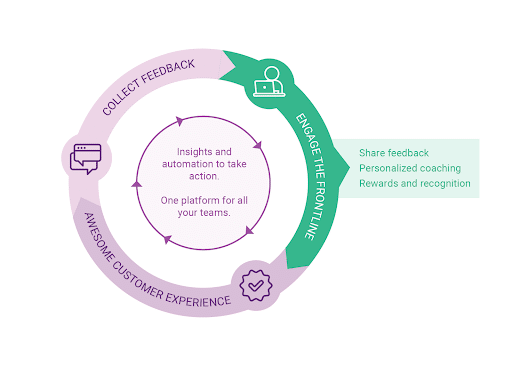
Image Source

If a program isn’t moving anything measurable after two cycles, change it. Sunk cost has killed more L&D budgets than bad content ever did.

Step 8: Keep the Data Alive

Stale talent data is worse than none, because it produces confident wrong answers.

Someone earns a certification, changes roles, picks up a skill on a side project, and if none of that reaches the system, every downstream analysis is built on last year’s workforce. So:

  • Embed updates into workflow moments. After a project retro or a certification exam, prompt the refresh right then.
  • Integrate systems so LMS completions, badges, and performance notes sync to the HRIS automatically, rather than waiting on manual entry that never happens.
  • Audit periodically. Sample profiles at random, measure accuracy, run a quick campaign to close what’s drifted.

Assign an owner. Data without an owner decays on a schedule you can set your watch to.

Where to Start

Inventory what you have, in a language your people recognize. Build pathways that fit the skill. Make learning visible. Measure in the work, not the LMS. Keep the data fresh.

A platform like Engagedly can carry most of that weight in one place, from skills inventories and performance data to learning pathways and the dashboards that keep them honest.

In a world where nearly half of core skills are in flux, the teams that see gaps forming get to close them on their own schedule. Everyone else finds out at the post-mortem.

How AI Is Reshaping the HR Tech Stack: What to Automate & What to Humanize

These days, the HR tech stack is crowded with HRIS for employee data, ATS for resume screening, a separate payroll system, and various tools for performance management, learning, and employee engagement. 

Each tool solves a problem, but together they create duplicate and inefficient work, which causes problems for HR. Leaders spend hours reconciling data across systems, and employees struggle with disconnected platforms. In short, the tools are there, but they don’t deliver the experience humans expect. 

This is where AI in HR comes into play. AI automates HR tasks, such as candidate hiring and responding to employee queries, allowing HR to focus on building healthy environments where everyone feels heard and supported. 

Additionally, the future of HR lies in striking a balance between HR automation and human-centered approaches.

In this article, we will discuss:

  • How AI is transforming the modern HR tech stack
  • Which HR tasks can and should be automated
  • Where human judgment and empathy remain irreplaceable
  • Actionable insights from Engagedly and Mentoring Complete on blending automation with people-first strategies

How AI Is Transforming the HR Tech Stack

AI is no longer an experimental feature. It has become an essential part of the HR tech stack. AI provides a unified hub of tools where all processes are managed seamlessly and efficiently, powered by AI HR assistants.

Here’s how AI is transforming the HR tech stack:

  • Data-driven decision making: An AI analytics tool can predict which employee is planning to leave the company by using the data it has collected about that individual. That employee can be an ideal leader or the best fit for a particular role. 
  • Workflow automation: The routine tasks of HR, like resume screening or ensuring timely payment for all employees, are automated using AI. 
  • Personalized learning & development: AI helps in suggesting personalized learning resources to your employees according to their role and areas of improvement. The sessions and courses recommended by AI are backed by the data and the performance of the employee. 
  • Employee support: There are common questions that employees ask HR. Instead of replying the same answer to everyone, AI chatbots or tools like voice AI API can answer these questions. These platforms can even help resolve other queries that your employees may not convey to you.


Source


What Should Be Automated

The most important contribution of AI in HR is automating the routine tasks of HR leaders and making the HR tech stack seamless rather than fragmented. HR automation takes over tasks that require less human input.

But there’s a thin line between what should be automated and what should not. First, let us see the tasks that should be automated:

Routine Processing and Administrative Workflows

Administrative tasks like screening hundreds of resumes for open positions, sending out reminders for mandatory training sessions, or ensuring payroll entries match employee records consume a major share of the HR team’s time. HR automation frees up time and reduces the risk of human error.

For example, AI-powered resume parsing can instantly identify skills and qualifications that match a job description. Similarly, scheduling software can schedule interviews through emails and coordinate them on the calendar.

Predictive Analytics and Talent Matching

Generally, HR decisions are based on historical data and gut feeling. However, AI in
HR can process huge datasets and reveal patterns to help leaders predict future requirements. Automated systems can flag employees who might be at risk of disengaging from the company.

Instead of spending hours building spreadsheets or interpreting other data points, HR professionals receive clear, actionable insights that empower efficient decisions. Discover how Engagedly’s AI powered platform streamlines HR processes, elevates performance outcomes, and enhances every stage of the employee lifecycle.

Learning and Development Support

Every organization knows that employees want career growth, but providing personalized courses or sessions for each employee is challenging. AI bridges this gap by analyzing employee profiles, identifying knowledge gaps, and automatically recommending relevant micro-learning modules or mentorship opportunities. 


AI in HR automation solves this by analyzing the learner’s skills, identifying gaps, and recommending the most relevant courses, internal case studies, or mentors for their development.

The most powerful approach combines HR AI systems with the operational tools employees already use on the job. 

For example, a sales representative might benefit from integrating outbound call tracking with learning platforms. This allows AI to analyze real sales call data, including call duration, conversion rates, and conversation outcomes. If a rep shows lower conversion rates, AI automatically recommends targeted training on objection handling or discovery techniques.

This setup means that how well someone does their actual job determines what training they get, it makes the learning more useful and practical than standard training programs that everyone takes.

Performance Tracking and Feedback Cycles

In many organizations, feedback often gets delayed, not because managers don’t want to give it, but because of heavy workloads, deadlines, and shifting priorities that push it down the list.

For example, a manager may have planned a one-on-one feedback session, but urgent deliverables took over, and the employee would not get that feedback on time.

From an HR perspective, this delay creates a bigger issue in the performance metrics. Employees continue to work with the same habits, as they are unaware of areas that need improvement.

But with AI tools, you can provide feedback on time and track performance accurately. AI automatically sends feedback and creates dashboards where employees and managers can track the progress and suggest improvements. See how Engagedly brings AI into core people operations to simplify workflows, support data informed decisions, and optimize talent management.

What Should Be Humanized


Source

Despite AI’s power, it cannot replace human empathy, cultural understanding, or ethical judgment.

Some of the areas that are beyond AI are:

Emotional Intelligence and Trust

AI may flag the signs of disengagement of an employee, but it cannot replace the human side of care. Emotional support, career coaching, and sensitive conversations require empathy and trust. 

For example, AI may flag that an employee is disengaged because it observed that they are not active during internal communication. But there might be a possibility that the real reason for disengagement may be personal stress or a lack of confidence in their role. Here, human-centered HR ensures employees feel heard rather than “monitored.”

Strategic Conversations

AI can represent trends, analyze data, and suggest patterns, but the interpretation of those insights requires human intelligence. Setting up a healthy company culture, developing a vision for the company, or solving organizational conflicts requires a strategic approach.  

For example, with an AI system, you can observe that a team consistently misses deadlines due to unclear responsibilities. Even then, the AI tool accepts human insight to rebuild trust within the team and design a strategic workflow for the team. 

Diversity and Inclusion Efforts

Algorithms are efficient only if the data fed to them is efficient. If something remains unchecked, then they may inherit systematic biases.

For example, Amazon had to scrap its AI recruitment tool because it downgraded resumes containing the word “women’s”. This is why D&I efforts must always be human-led. AI should be treated as an early-warning system, not the ultimate decision-maker.  

By combining AI with human insights, companies can create a workspace where every employee feels safe, heard, and happy.

HR FunctionAutomate with AIKeep Human
Resume ScreeningIntelligent parsing & rankingInterviews & final decision
OnboardingForms, checklists, compliance tasksPersonalized welcome & cultural integration
Learning & DevelopmentSkill-gap analysis, personalized course recommendationsMentoring and coaching
Employee QueriesFAQ botsSensitive, complex topics
Performance ManagementMetrics tracking, feedback reminders1:1 coaching & growth discussions

Case Study: How Experian Transformed Performance Reviews With Engagedly

Let’s now look at how Engageley’s AI tools helped Experian automate its performance review process.

About the company:

Experian is the leading global information services company, providing data and analytical tools to businesses. They help companies manage credit risk, prevent fraud, target marketing offers, and automate decision-making. 

The Challenge: Outdated and inefficient review system

Experian struggled with a manual, document-heavy performance review process. The major challenges the company faced were:

  • They had a manual review system using Word documents. 
  • Managers and employees needed up to 4 months to complete reviews.
  • No centralized performance tracking or goal alignment
  • Employees felt disengaged and disconnected from company success
  • The inefficient process drained motivation and wasted employees’ time

The Solution: Engagedly’s integrated platform 

To overcome the challenges, Experian implemented Enagagedly’s tools to automate and streamline performance management.

  • Automated Reviews: Engagedly reduced review cycle time from four months to four weeks by replacing manual documents with a centralized digital platform.
  • Continuous Feedback & Goal Alignment: The system created a “living, breathing process” that connected individual performance to company goals throughout the year. The continuous feedback loop allowed managers to provide real-time feedback, helping employees to stay on track and align their efforts with the business objectives.
  • Gamification for Engagement: Custom badges and points allowed employees to recognize each other’s contributions in real-time. 

The Result: Improved performance reviews

Within six months of implementation, Experian achieved significant improvements:

  • 10% Increase in Employee Engagement – Gamification and continuous feedback made employees feel more connected to their work and the company’s mission.
  • 75% Reduction in Review Time – Review cycles dropped from four months to just four weeks, improving productivity.
  • 100% Employee Participation – Within two weeks of launch, the HR team onboarded all employees, and they actively used the system.

Mark Nemeth, Head of Performance Optimization, said,

“We have revolutionized the efficiency of reviews. Engagedly has made it easy to track performance and align individual efforts with company goals. Now, performance management is a continuous process rather than a once-a-year event.”

Strike the Right Balance Between Automation & Human Touch

AI frees HR from repetitive tasks, so they can focus on more important matters. But the human touch remains essential for empathy, judgment, and meaningful connection.

The bottom line is knowing what to automate and what to humanize. AI is an enabler, yet people are still at the center. Your goal should be to blend both to create an efficient and people-first workplace.

Key takeaways:

  • Automate routine tasks like resume screening, FAQs, and analytics.
  • Keep human involvement in strategic, emotional, and ethical decisions.
  • Combine AI insights with human mentorship.

Explore how Engagedly can help you build a human-centered HR process with smart automation.

The AI in HR tech stack is evolving quickly, and 2025 will bring even more changes. HR leaders should prepare for these upcoming trends:

  1. Hyper-Personalized Employee Journeys
    Instead of one-size-fits-all programs, AI will create tailored onboarding, learning, and career paths for every employee. For example, a new hire in sales might instantly get role-specific learning modules, while an engineer could be matched with a technical mentor.
  2. AI-Powered Retention Tools
    With high turnover costing companies millions, predictive analytics will be used to spot early signs of disengagement. The AI in HR tech stack will flag patterns like low participation in team chats or declining performance scores, so managers can step in before it’s too late.
  3. Voice and Conversational AI
    Chatbots are already answering FAQs, but the next step is natural voice-based systems. Imagine employees asking HR questions through smart assistants, like “How many vacation days do I have left?” and getting instant answers.
  4. Deeper Integration Across Tools
    One of the biggest complaints today is tool overload. In 2025, the AI in HR tech stack will move toward unified dashboards, reducing the need for HR teams and employees to juggle multiple platforms.
  5. Ethical and Transparent AI
    As AI takes on bigger roles, transparency will become non-negotiable. Employees will want to know how decisions are being made — especially around promotions, performance ratings, or hiring. Ethical use of data will be a priority for HR leaders.

👉 In short, the future of the AI in HR tech stack isn’t just about automation — it’s about smarter insights, personalization, and trust. Companies that prepare now will have a competitive advantage in retaining and engaging their workforce.

FAQs

1. What is the biggest advantage of using AI in HR tech?

AI is immensely helpful because it takes over repetitive work and provides actionable insights. This frees up the time for HR professionals to focus on people-first initiatives.

2. Can AI replace HR managers?

No. AI only complements HR professionals by automating tasks. Empathy, judgment, and culture-building will remain human-led.

3. How do I ensure AI stays ethical?

AI systems can unintentionally inherit bias from the data they are trained on. This creates an issue of unfairness in the insights. To avoid this, organizations should audit these tools regularly.

Author’s Bio: Natasha is an outreach specialist with experience in sales and digital marketing. She has spent the last 2 years in digital marketing, developing successful outreach campaigns. In her free time, she enjoys playing basketball, cooking, and exploring new places.