“Culture hides much more than it reveals, and strangely enough, what it hides, it hides most effectively from its own participants.” – Edward T. Hall
The Cultural Iceberg Model is a framework created by anthropologist Edward T. Hall in 1976 that compares culture to an iceberg. Roughly 10% of culture sits above the waterline as visible behavior, things like language, dress, food, and rituals. The other 90% sits below the surface as invisible drivers such as beliefs, values, communication styles, and assumptions about authority and time. In the workplace, most conflict and disengagement trace back to that hidden 90%, not the visible 10%, which is why HR teams use the model to diagnose culture problems that surveys alone tend to miss.
Anthropologist Edward T. Hall’s amazing observation illustrates the complexity of knowing culture in the workplace. Creating an inclusive workplace involves more than just addressing surface-level inequalities. True inclusiveness requires a deeper comprehension of the visible and unseen cultural elements influencing the interactions, behavior, and perceptions of your team.
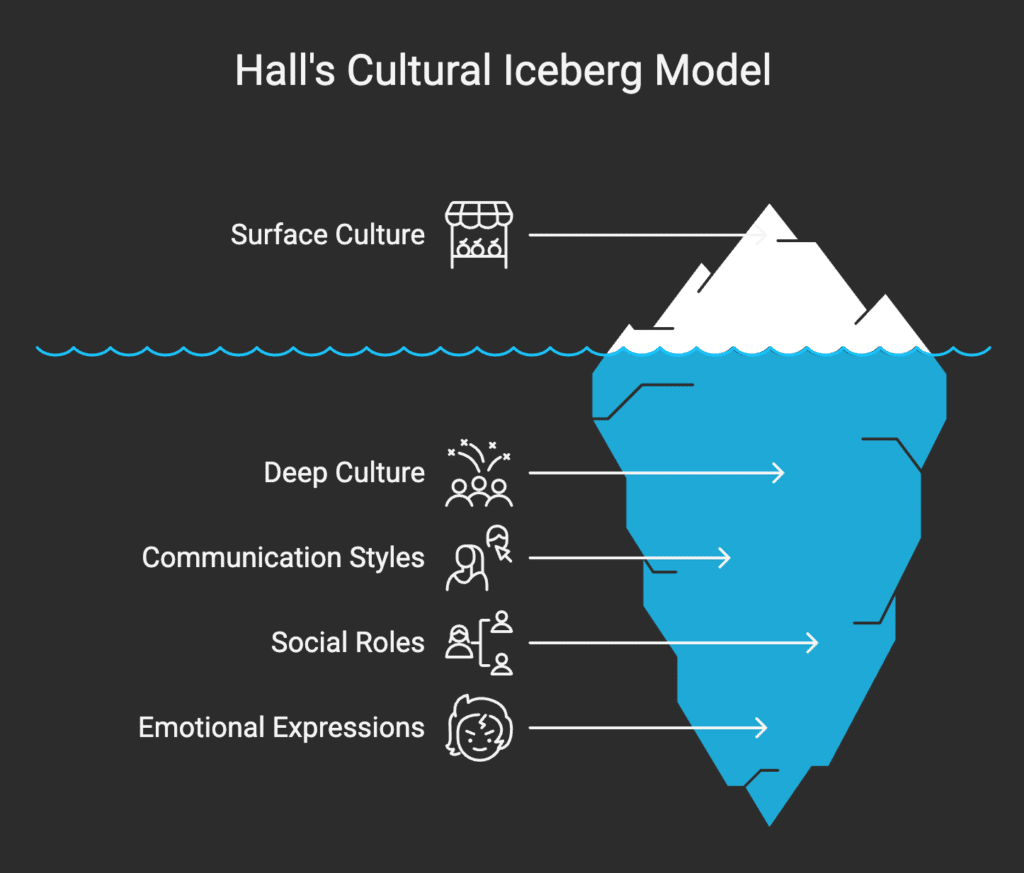
Companies can use Hall’s Cultural Iceberg Model as a guide to help them discover these hidden cultural layers and create cultures where every employee feels empowered and appreciated.
In a world where 81% of employees said they would leave a company not committed to diversity and inclusion, understanding cultural dynamics is not just a nice-to-have but a strategic imperative.
Visible cultural aspects – such as dress codes, language, and rituals – are just the tip of the iceberg. Below the surface lie invisible elements like beliefs, values, and perceptions that significantly influence workplace dynamics and employee engagement.
This blog explores the Cultural Iceberg Model and its relevance in modern workplaces. You’ll discover actionable strategies to recognize and address hidden cultural dynamics and overcome challenges in building an inclusive workplace.
Understanding the Cultural Iceberg Model
Anthropologist Edward T. Hall introduced the Cultural Iceberg Model in 1976 to illustrate that culture comprises both observable and unobservable elements. Like an iceberg, where only a small portion is visible above the waterline, the majority of cultural elements lie beneath the surface.
| Aspect | Description | Examples |
| Above the Surface (Visible Culture – 10%) | Easily observable elements that represent a small part of culture. | 🔹 Language 🔹 Clothing 🔹 Food 🔹 Music 🔹 Art 🔹 Festivals 🔹 Gestures 🔹 Behaviors 🔹 Social norms |
| Below the Surface (Invisible Culture – 90%) | Deeper cultural elements that shape behaviors, attitudes, and social norms but are harder to see. | 🧠 Beliefs 🧠 Values 🧠 Thought patterns 🧠 Attitudes 🧠 Communication styles 🧠 Roles and expectations 🧠 Taboos 🧠 Concept of time 🧠 Relationship dynamics 🧠 Sense of humor 🧠 Family roles 🧠 Decision-making styles |
| Key Message | To understand culture fully, you must explore the hidden layers that shape visible behaviors. | “Culture is more than what meets the eye!” |
This approach highlights that although certain cultural elements are visible, a large percentage is concealed and has a subtle but profound impact on actions and attitudes.
Visible Cultural Elements
The visible part of the cultural iceberg consists of aspects easy to see and identify. These encompass:
- Language: The specific jargon, terminology, and modes of communication prevalent in the workplace.
- Dress Codes: The attire deemed appropriate or expected within the organizational setting.
- Traditions and Rituals: Regularly practiced events or ceremonies that hold significance for the organization.
- Behaviors and Etiquette: The accepted ways of interacting, including manners, gestures, and conduct.
These elements are the manifestations of deeper cultural values and beliefs, providing insights into the organization’s surface-level culture.
Invisible Cultural Elements
Though not immediately obvious, the invisible aspects of culture have a major influence on organizational dynamics. Among these are:
- Beliefs: The basic ideas or accepted truths held by people working for an organization.
- Values: Standards or guidelines members of a company value most and follow.
- Thought Patterns: The organizational members’ habitual way of thinking and reasoning.
- Views: The ways in which particular events, actions, or behaviors are interpreted and assigned significance.
Knowing these hidden elements is essential since they affect the fundamental reasons and attitudes guiding visible actions.
Where the Cultural Iceberg Model Actually Comes From
Edward T. Hall developed the iceberg analogy in his 1976 book Beyond Culture, building on his earlier work in The Silent Language. Hall was one of the first anthropologists to argue that culture is learned mostly outside conscious awareness, which is why two people from different backgrounds can follow the exact same company handbook and still misread each other constantly.
The iceberg image stuck because it is intuitive. Only a small percentage of an actual iceberg shows above the waterline, and the same is roughly true of culture. Hall’s original estimate put visible culture at around 10% and invisible culture at around 90%. That ratio is a teaching device, not a measured statistic, so treat it as directional rather than exact.
Since then, other researchers have built on the same idea. Geert Hofstede’s “onion model” of culture and the more recent work on psychological safety by Amy Edmondson both extend Hall’s core insight that what people do is shaped by things they usually cannot name.
The Impact of Hidden Cultural Elements on Workplace Dynamics

The unseen facets of culture have a big impact on how workers interact, decide, and view their positions in the company. For example:
- Communication Styles: Cognitive habits and cultural beliefs impact the decision of whether to communicate directly or indirectly, formally or informally.
- Methods of Conflict Resolution: Strongly held views affect whether disputes are resolved amicably or in a hierarchical manner, as well as whether solutions are sought out in public or kept confidential.
- Attitudes Toward Authority: People’s perceptions of positions of authority and the allocation of power are influenced by their cultural backgrounds.
By examining these components, leaders can better comprehend particular behaviors and implement policies to encourage a more inclusive workplace.
How the Cultural Iceberg Shows Up in Hybrid and AI-Assisted Teams
Hybrid work and AI tools have pulled even more of workplace culture below the waterline. When teams sit in the same room, some invisible cues still leak through body language and hallway conversations. Remote and hybrid teams lose most of that, so misread signals about tone, urgency, and hierarchy show up more often in Slack threads and async video than they used to.
A few patterns worth watching in 2026:
- AI-assisted communication is flattening tone cues. When people use AI to draft messages, cultural markers like formality, hedging, and directness get smoothed out, which can hide the very signals leaders rely on to sense friction early.
- Async-first teams surface hidden norms faster. A norm like “we don’t say no directly, we say ‘let me check'” becomes a real bottleneck once decisions have to happen in writing instead of a hallway conversation.
- Four generations are now working side by side, and each brings different unspoken assumptions about feedback, hierarchy, and what “being responsive” even means. A Gen Z hire expecting same-day Slack replies and a Gen X manager expecting end-of-day email responses aren’t being difficult, they’re just running on different invisible norms about time.
Gallup’s 2026 State of the Global Workplace report found that global employee engagement fell to just 20% in 2025, the lowest level since 2020, and estimated the cost of that disengagement at more than $10 trillion in lost productivity worldwide (Gallup, 2026). Much of that decline traces back to invisible cultural friction, not visible policy failures, which is exactly the layer the iceberg model is built to diagnose.
Strategies for Building an Inclusive Workplace

To take advantage of the insights provided by the Cultural Iceberg Model, consider utilizing the following strategies:
Training in Cultural Competence
Provide employees with the resources they need to recognize and appreciate visible and invisible cultural elements. This training should cover:
- Awareness: Being aware of one’s own assumptions and cultural biases
- Knowledge: Gaining awareness of various cultural perspectives and practices.
- Skills: Interpersonal tactics, effective communication, and cross-cultural learning.
- Attitude: Promoting tolerance and curiosity about cultural differences.
Encourage Open Communication
Provide safe spaces where employees can freely express their perspectives and experiences. Practices like 360 degree feedback help surface diverse perspectives more consistently. This can be made possible by:
- Focus Groups: Diverse groups that discuss cultural concerns and share personal stories.
- Town Hall Meetings: Forums for conversations about cultural issues within the organization.
- Anonymous Channels for Feedback: Letting employees freely express concerns or thoughts regarding cultural inclusivity.
Implement Inclusive Policies
Create and implement policies honoring and respecting many cultural customs and beliefs. this covers:
- Flexible Religious Observance Policies: Policies allowing time off or flexible scheduling for different religious activities.
- Inclusive Holiday Recognitions: Celebrating and honoring a range of cultural festivals and events.
- Diverse Dietary Accommodations: Make sure cafeterias and business activities include choices that respect different cultural dietary limitations.
Build Diverse Teams
Combine groups with different cultural backgrounds to improve decision-making and innovation. Different teams contribute:
- Multiple Perspectives: Leading to more innovative solutions.
- Broader Skill Sets: Combining different strengths and experiences.
- Improved Problem-Solving: By considering a wider range of factors and potential impacts.
Ongoing Education
Promote continuous learning and awareness to match best practices in inclusiveness and cultural dynamics. One can accomplish this with:
- Regular Workshops and Seminars: Focusing on various cultural subjects and newly arising concerns.
- Access to Resources: Providing books and online courses on cultural competency and inclusiveness.
- Encouraging Language Learning: Providing tools or courses for employees to pick up new languages, improving communication, and respect for different cultures.
The Business Case for Inclusivity
Adopting cultural variety and tolerance is not only moral but also has actual economic advantages. Studies on inclusive cultures indicate that businesses with them are 1.7 times more likely to inspire creativity. Moreover, inclusiveness helps to improve employee satisfaction, financial performance, and outcomes of decisions. Let us now consider some particular advantages backed by present research.
Better problem-solving and decision-making
McKinsey’s most recent global diversity study, based on 1,265 companies across 23 countries, found that companies in the top quartile for both gender and ethnic diversity were 39% more likely to financially outperform those in the bottom quartile (McKinsey & Company, “Diversity Matters Even More”).
Retention and engagement are getting harder to ignore
A GoodHire survey of 3,000 U.S. workers found that 81% would consider leaving a job if their employer showed no commitment to diversity, equity, and inclusion, and that number rose to 87% among people in leadership roles (GoodHire via Business Wire, 2022). At the same time, Gallup’s 2026 report shows global engagement has been sliding for two straight years, dropping to 20% in 2025 (Gallup, 2026), which suggests companies that skip the invisible layer of culture are losing people faster than they think.
Diverse teams still out-innovate less diverse ones
Boston Consulting Group’s study of 1,700 firms across eight countries found that companies with above-average management diversity earned 19 percentage points more of their revenue from innovation, 45% of total revenue compared to 26% for less diverse companies (BCG, “How Diverse Leadership Teams Boost Innovation”).
Talent still cares, even in a tighter job market
Glassdoor’s D&I workplace survey found that 76% of employees and job seekers say a diverse workforce is an important factor when evaluating companies and job offers (Glassdoor D&I Workplace Survey).
Stronger Market Representation
An inclusive workforce mirrors the diversity of your customers, enabling better understanding and alignment with market needs. This adaptability allows inclusive organizations to anticipate and meet the demands of a broader customer base.
Practical Applications of the Cultural Iceberg Model
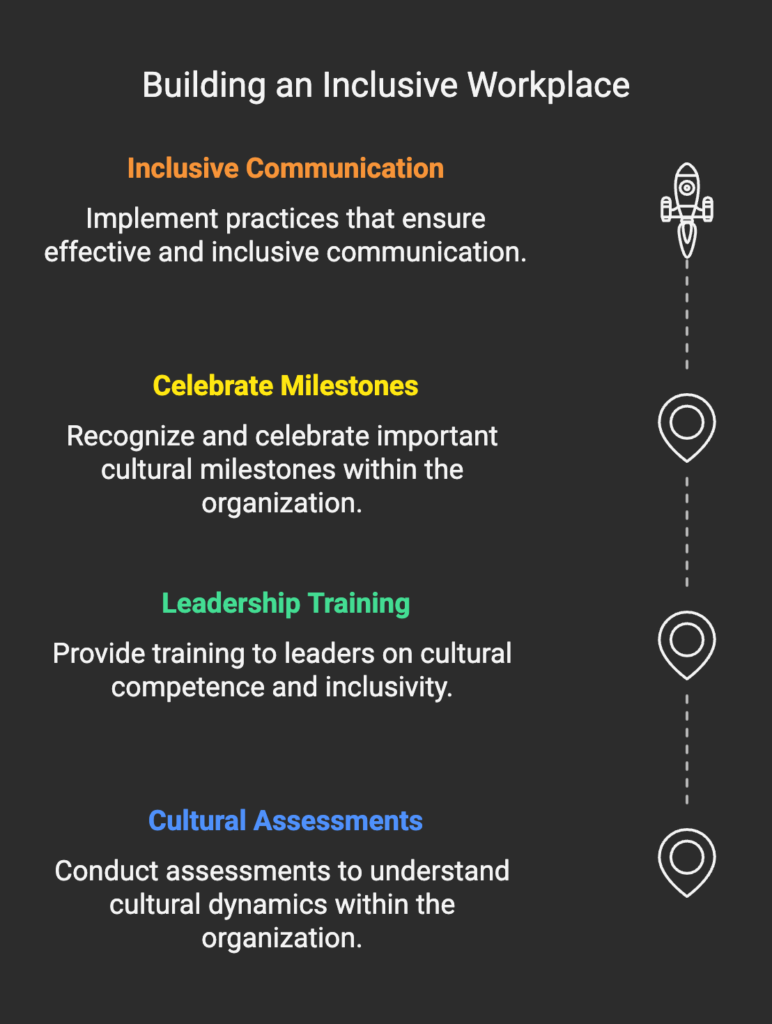
To truly leverage the Cultural Iceberg Model for building an inclusive workplace, it’s vital to incorporate actionable steps into your organizational strategies. Here’s how:
1. Conduct Cultural Assessments
Regularly assess your organization’s cultural landscape to identify visible and hidden dynamics. Use surveys, one-on-one interviews, and anonymous feedback tools to gather honest insights. These assessments should focus on understanding employees’ experiences, attitudes, and perceptions of inclusivity.
2. Provide Leadership Training
Equip your leadership with tools to navigate cultural differences effectively. Cultural competence should be a core part of leadership development programs. These programs can include:
- Conflict resolution techniques tailored to diverse groups
- Training to identify and mitigate unconscious bias
- Strategies to build trust and rapport across cultural boundaries
3. Celebrate Cultural Milestones
Showcase your commitment to inclusivity by celebrating cultural events and milestones. Create a shared calendar of holidays and cultural observances from around the world and encourage participation. Examples include:
- Hosting potluck lunches with dishes from different cultures
- Recognizing international days such as Pride Month or International Women’s Day
- Sharing stories or cultural artifacts in company newsletters or social media
4. Adopt Inclusive Communication Practices
Language is a powerful tool in fostering inclusivity. Use simple, accessible language in all organizational communications to ensure understanding across diverse employee groups. Consider:
- Avoiding jargon that might alienate non-native speakers
- Translating key materials into multiple languages
- Encouraging active listening and validation during team discussions
How Do You Actually Measure the Invisible 90%?
You measure the invisible layer of culture by watching for gaps between what people say and what they do, not by asking about values directly. Three practical signals work well.
- Compare stated values against decision patterns. If your handbook says “we value direct feedback” but promotion data shows people who raise concerns get passed over, that gap is the real culture.
- Track participation asymmetry in meetings and async threads. Who talks first, who gets interrupted, and who only agrees in private DMs after a meeting ends all point to unspoken hierarchy rules.
- Run anonymous pulse checks specifically on psychological safety, not general satisfaction. General engagement scores can look fine while trust is quietly eroding underneath.
Challenges in Building an Inclusive Workplace
Building an inclusive workplace is not without its challenges. Organizations may face resistance to change, difficulties in identifying unconscious biases, or a lack of understanding of cultural nuances. However, these obstacles can be overcome through deliberate efforts and a commitment to continuous improvement.
Overcoming Resistance to Change
Resistance often stems from fear of the unknown or entrenched stereotypes. To address this, organizations should:
- Communicate the benefits of inclusivity clearly and frequently.
- Involve employees at all levels in the process of cultural transformation.
- Highlight success stories from other organizations to build confidence in the initiative.
Addressing Unconscious Bias
Unconscious biases can influence decisions in hiring, promotions, and day-to-day interactions. Combatting these biases requires structured approaches, such as:
- Conducting regular bias-awareness workshops.
- Using data-driven tools for performance reviews and hiring processes.
- Encouraging diverse interview panels to minimize groupthink.
Bridging Cultural Gaps
Misunderstandings can arise when cultural differences are not acknowledged or respected. Building bridges requires proactive measures:
- Pairing employees from different cultural backgrounds in mentorship programs.
- Encouraging cross-departmental collaboration to expose employees to diverse perspectives.
- Promoting the use of empathy as a core workplace value.
Conclusion
Understanding the cultural iceberg offers a profound way to view and shape workplace dynamics. By recognizing that culture extends beyond what is immediately visible, you gain the tools to navigate hidden influences that shape behavior, communication, and collaboration. This deeper awareness not only strengthens inclusivity but also enhances innovation, employee satisfaction, and organizational performance.
Leaders who invest in this process empower their organizations to adapt, thrive, and remain competitive in an increasingly diverse global market.
If you’re looking for a partner to support your inclusivity and engagement efforts, Engagedly provides innovative solutions to help you create a workplace where every voice matters. If you’re looking to turn cultural insights into measurable engagement and performance outcomes, you can request a demo to see how leading organizations operationalize inclusion.
FAQs
What does the Cultural Iceberg Model explain?
Developed by anthropologist Edward T. Hall, this framework illustrates that culture operates exactly like an iceberg:
The Surface (10%): The external, highly visible aspects of culture that are easy to observe, such as language, food, dress, and holiday traditions.
Deep Subsurface (90%): The hidden internal drivers – including core values, unconscious biases, thought patterns, and definitions of family or success – that lie completely out of view.
Understanding this model helps organizations realize that true cross-cultural alignment requires looking past surface-level traits to decode the deep, unseen values that drive human behavior.
What is visible culture vs hidden culture?
The model divides human behavior into clear observable actions and the underlying mental programming that dictates them:
Visible Elements: Direct verbal language, corporate dress codes, physical gestures, religious rituals, and explicit workplace etiquette rules.
Invisible Elements: Implicit notions of time (punctuality vs. flexibility), attitudes toward authority figures, risk tolerance, decision-making styles, and patterns of processing praise or criticism.
Because invisible cultural aspects dictate how employees interpret intent and safety, recognizing them is the secret to managing diverse teams smoothly.
Why is the Cultural Iceberg Model useful in organizations?
Most intercultural conflicts in global business do not stem from visible differences like language barriers; they stem from clashing, unspoken expectations. Applying this model in the workplace delivers vital strategic benefits:
Slashes Interpersonal Friction: Teammates learn not to take contrasting communication styles as personal slights.
Improves Inclusive Leadership: Managers learn to adjust their coaching and incentive structures to align with diverse internal motivators.
Optimizes Global Teamwork: Helps cross-functional, multi-national teams design workflows that respect varying cultural approaches to autonomy and collaboration.
How does the model improve communication at work?
When employees realize that visible behaviors are driven by deep-seated invisible rules, they build psychological empathy and learn to decode communication accurately. For example, rather than labeling an employee from an indirect-communication culture as “evasive,” a calibrated manager understands they are exercising respect and maintaining group harmony. This structural shift from judgment to curiosity allows global organizations to avoid harmful stereotyping and build lasting trust.
How do organizations use the Cultural Iceberg Model?
Translating this anthropological theory into a day-to-day corporate asset requires active cultural governance:
Deploying Cultural Intelligence (CQ) Training: Running interactive workshops that teach teams how to navigate hidden cultural norms and cognitive styles.
Restructuring Feedback Frameworks: Designing multiple pathways for employees to share feedback (such as written forms, private 1-on-1s, or text chat) to accommodate varying comfort levels with authority.
Evaluating Core Biases: Auditing corporate policy documents and performance metrics to ensure they don’t inadvertently penalize invisible cultural habits, such as valuing collaboration over aggressive individual self-promotion.